Roland CUBE-10GX Guitar Amplifier powered portably with a USB-C power bank and a Birdcord PD→6V

How to Power the Roland CUBE-10GX with a USB-C Power Bank

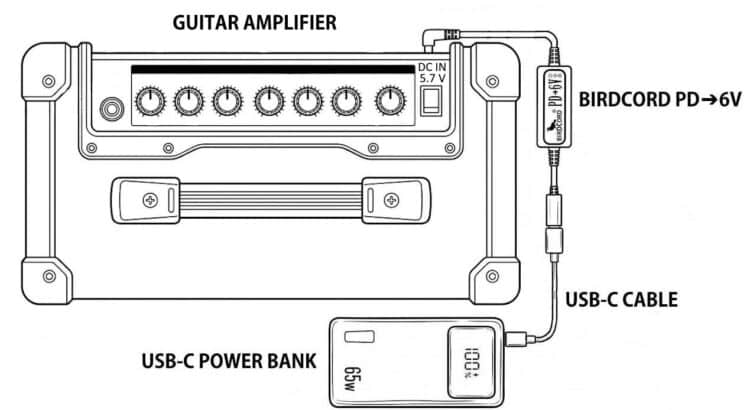
The Roland CUBE-10GX Guitar Amplifier can be powered from a USB-C power bank using a Birdcord PD➔6V power cable. The setup diagram below shows how to connect the devices for portable operation without a mains outlet, for example when playing music in your garden or for busking on the streets.
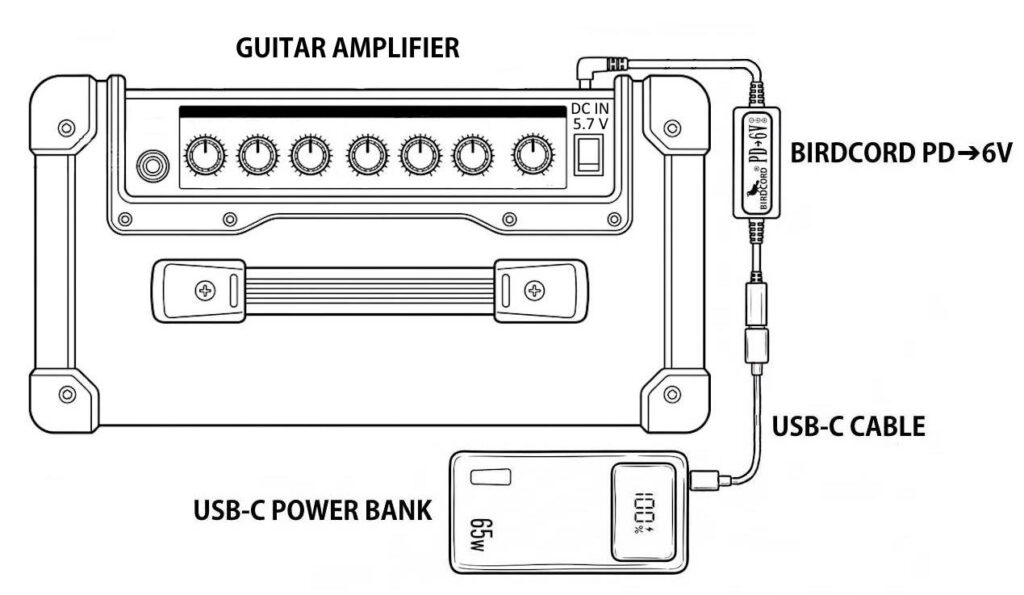
Roland CUBE-10GX Guitar Amplifier powered portably with a USB-C power bank and a Birdcord PD→6V

Quick Facts: Roland CUBE-10GX Mobile Setup

DeviceRoland CUBE-10GX
Supply voltage5.7-6 V DC
Current draw0.7 A
Power consumption4.2 W
Connector5.5 x 2.1 mm
PolarityCenter negative
Power sourceUSB-C power bank*
Compatible power converterBirdcord PD➔6V
StatusTested and verified

*Note: Use a USB-C power bank with USB Power Delivery (PD) and/or Quick Charge 4/4+ support. The power rating should be higher than the power consumption.

What You Need

✅ Birdcord PD➔6V – A compact USB-C power cable that requests 9 V output from a compatible USB-C power bank, converts it to 6 V, and delivers it to the Roland CUBE-10GX. View product

✅ USB-C Power Bank – A power bank that supports USB Power Delivery (PD) and/or Quick Charge 4/4+. A minimum rating of 18 W and 10,000 mAh is recommended. Recommended: INIU 65 W 20,000 mAh USB-C PD Power Bank

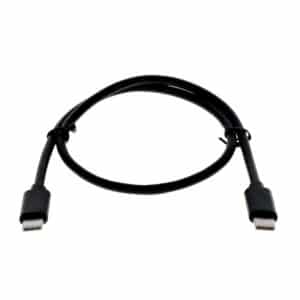
✅ USB-C cable – To connect the power bank to the Birdcord PD➔6V (usually included with the power bank). View product

How It Works

The Roland CUBE-10GX requires a DC power supply in the 5.7-6 V range. USB-C power banks typically provide 5 V by default, so a compatible voltage converter is needed to obtain the required voltage.

The Birdcord PD➔6V negotiates a 9V DC output with a compatible USB-C power bank and converts it to 6 V DC for the CUBE-10GX.

Connect the Birdcord PD➔6V to the power bank using a USB-C cable, then plug the DC connector into the CUBE-10GX. The setup works exactly like using the original power adapter, but gives you the freedom to create music anywhere.

Frequently Asked Questions (FAQ)

How long can it run on a USB-C power bank?

With a standard 20,000 mAh (74 Wh) power bank, the Roland CUBE-10GX will run for over 14 hours of continuous use under typical operating conditions.

Will my existing power bank work?

Yes, as long as it supports 9 V output. You can easily check this by looking at the technical specifications printed in small letters on your power bank. If you see an output listing like 9V=2A, 9V=3A (or anything similar), it is compatible and will work perfectly. If it only lists 5V, it is not compatible.

Will this setup introduce any ground loop noise or hum?

No. Since your Roland CUBE-10GX is completely disconnected from the mains grid and runs on isolated battery power, you actually eliminate ground-loop hum. It is one of the quietest ways to power your gear.

Can I power other equipment from the same power bank?

Potentially, yes, provided the power bank has suitable outputs to meet the power requirements of all connected devices. You can usually find the output specifications printed in small letters on the back of the power bank.

Can this power setup damage my CUBE-10GX?

No. We thoroughly tested this setup and monitored the CUBE-10GX’s voltage regulator temperature throughout testing. The Birdcord PD➔6V supplies a slightly higher voltage than the original PSD power adapter. Our tests confirmed that the CUBE-10GX works reliably with this setup.
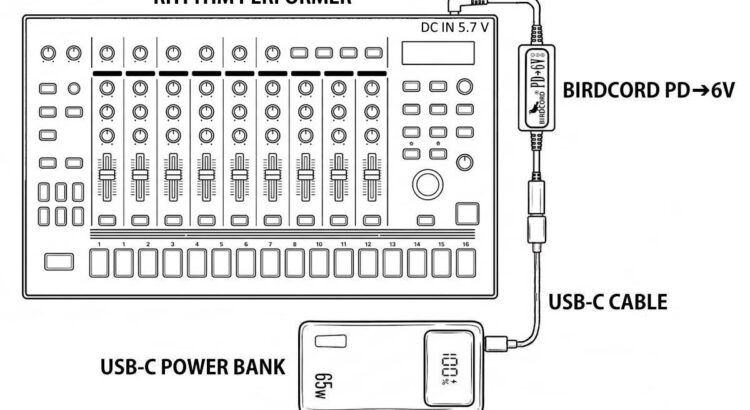
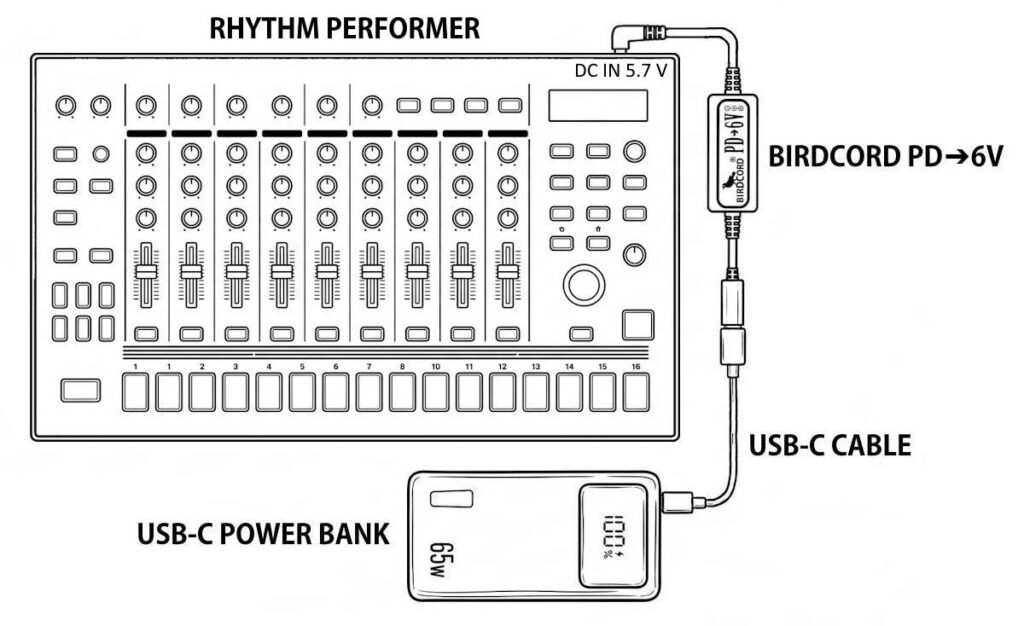
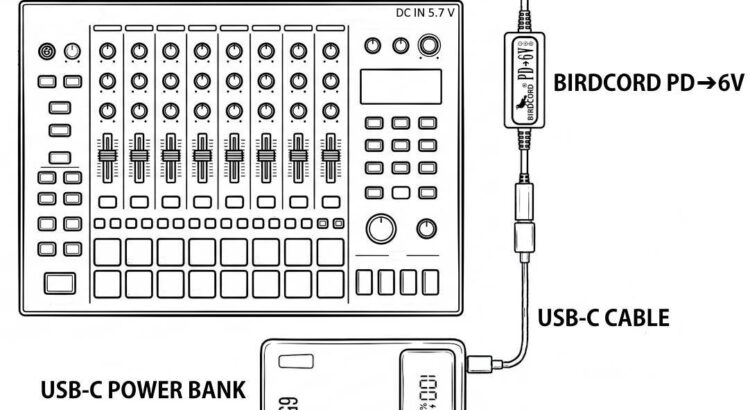
Roland TR-8S Rhythm Performer powered portably with a USB-C power bank and a Birdcord PD→6V

How to Power the Roland TR-8S with a USB-C Power Bank

The Roland TR-8S Rhythm Performer can be powered from a USB-C power bank using a Birdcord PD➔6V power cable. The setup diagram below shows how to connect the devices for portable operation without a mains outlet, for example when making music outdoors, travelling by train, or just sitting on the couch.

Roland TR-8S Rhythm Performer powered portably with a USB-C power bank and a Birdcord PD→6V

Quick Facts: Roland TR-8S Mobile Setup

DeviceRoland TR-8S
Supply voltage5.7-6 V DC
Current drawmax. 2.0 A
Power consumptionmax. 12 W
Connector5.5 x 2.1 mm
PolarityCenter negative
Power sourceUSB-C power bank*
Compatible power converterBirdcord PD➔6V
StatusTested and verified

*Note: Use a USB-C power bank with USB Power Delivery (PD) and/or Quick Charge 4/4+ support. The power rating should be higher than the power consumption.

What You Need

✅ Birdcord PD➔6V – A compact USB-C power cable that requests 9 V output from a compatible USB-C power bank, converts it to 6 V, and delivers it to the Roland TR-8S. View product

✅ USB-C Power Bank – A power bank that supports USB Power Delivery (PD) and/or Quick Charge 4/4+. A minimum rating of 18 W and 10,000 mAh is recommended. Recommended: INIU 65 W 20,000 mAh USB-C PD Power Bank

✅ USB-C cable – To connect the power bank to the Birdcord PD➔6V (usually included with the power bank). View product

How It Works

The Roland TR-8S requires a DC power supply in the 5.7-6 V range. USB-C power banks typically provide 5 V by default, so a compatible voltage converter is needed to obtain the required voltage.

The Birdcord PD➔6V negotiates a 9V DC output with a compatible USB-C power bank and converts it to 6 V DC for the TR-8S.

Connect the Birdcord PD➔6V to the power bank using a USB-C cable, then plug the DC connector into the TR-8S. The setup works exactly like using the original power adapter, but gives you the freedom to create music anywhere.

Frequently Asked Questions (FAQ)

How long can it run on a USB-C power bank?

With a standard 20,000 mAh (74 Wh) power bank, the Roland TR-8S will run for over 6 hours of continuous use under typical operating conditions.

Will my existing power bank work?

Yes, as long as it supports 9 V output. You can easily check this by looking at the technical specifications printed in small letters on your power bank. If you see an output listing like 9V=2A, 9V=3A (or anything similar), it is compatible and will work perfectly. If it only lists 5V, it is not compatible.

Will this setup introduce any ground loop noise or hum?

No. Since your Roland TR-8S is completely disconnected from the mains grid and runs on isolated battery power, you actually eliminate ground-loop hum. It is one of the quietest ways to power your gear.

Can I power other equipment from the same power bank?

Potentially, yes, provided the power bank has suitable outputs to meet the power requirements of all connected devices. You can usually find the output specifications printed in small letters on the back of the power bank.

Can this power setup damage my TR-8S?

No. We thoroughly tested this setup and monitored the TR-8S’s voltage regulator temperature throughout testing. The Birdcord PD➔6V supplies a slightly higher voltage than the original PSD power adapter. Our tests confirmed that the TR-8S works reliably with this setup.
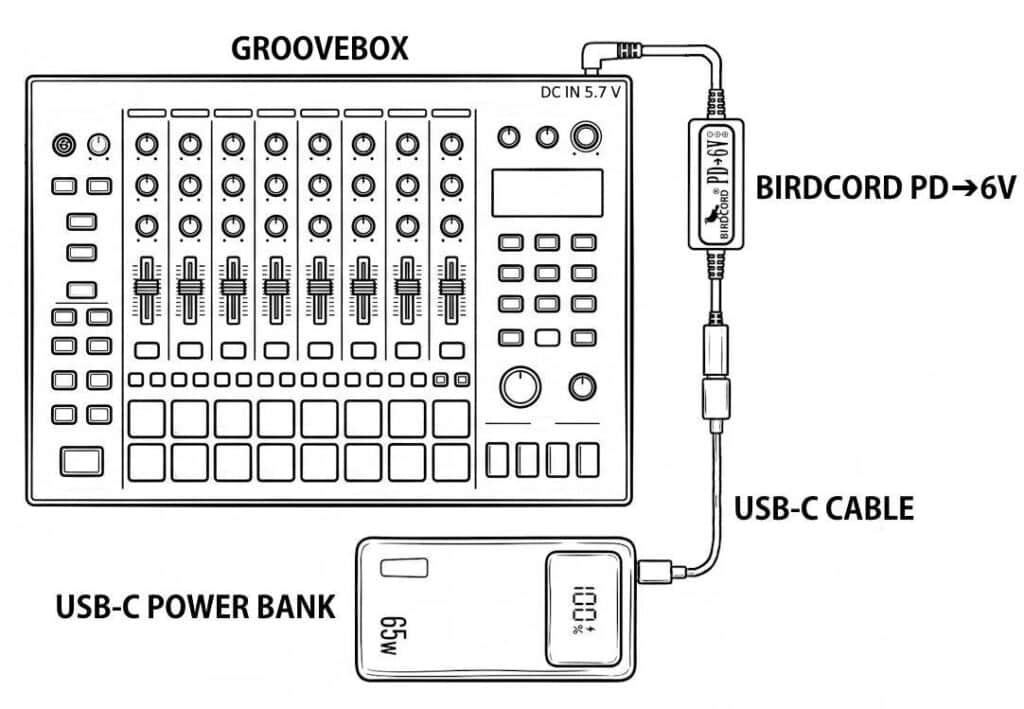
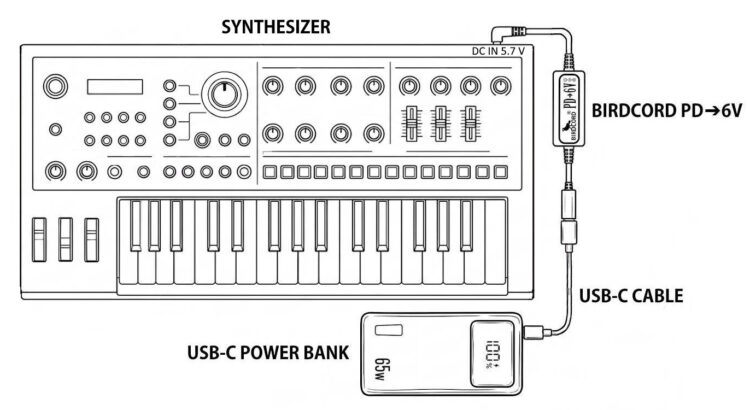
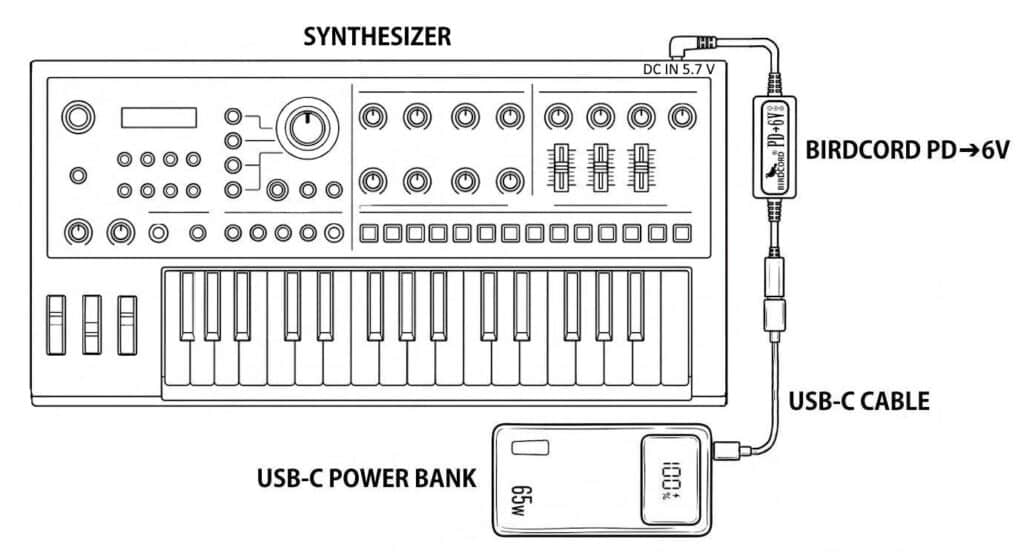
Roland JD-Xi Synthesizer powered portably with a USB-C power bank and a Birdcord PD→6V

How to Power the Roland JD-Xi with a USB-C Power Bank

The Roland JD-Xi Synthesizer can be powered from a USB-C power bank using a Birdcord PD➔6V power cable. The setup diagram below shows how to connect the devices for portable operation without a mains outlet, for example when making music outdoors, travelling by train, or just sitting on the couch.

Roland JD-Xi Synthesizer powered portably with a USB-C power bank and a Birdcord PD→6V

Quick Facts: Roland JD-Xi Mobile Setup

DeviceRoland JD-Xi
Supply voltage5.7-6 V DC
Current draw1.0 A
Power consumption6 W
Connector5.5 x 2.1 mm
PolarityCenter negative
Power sourceUSB-C power bank*
Compatible power converterBirdcord PD➔6V
StatusTested and verified

*Note: Use a USB-C power bank with USB Power Delivery (PD) and/or Quick Charge 4/4+ support. The power rating should be higher than the power consumption.

What You Need

✅ Birdcord PD➔6V – A compact USB-C power cable that requests 9 V output from a compatible USB-C power bank, converts it to 6 V, and delivers it to the Roland JD-Xi. View product

✅ USB-C Power Bank – A power bank that supports USB Power Delivery (PD) and/or Quick Charge 4/4+. A minimum rating of 18 W and 10,000 mAh is recommended. Recommended: INIU 65 W 20,000 mAh USB-C PD Power Bank

✅ USB-C cable – To connect the power bank to the Birdcord PD➔6V (usually included with the power bank). View product

How It Works

The Roland JD-Xi requires a DC power supply in the 5.7-6 V range. USB-C power banks typically provide 5 V by default, so a compatible voltage converter is needed to obtain the required voltage.

The Birdcord PD➔6V negotiates a 9V DC output with a compatible USB-C power bank and converts it to 6 V DC for the JD-Xi.

Connect the Birdcord PD➔6V to the power bank using a USB-C cable, then plug the DC connector into the JD-Xi. The setup works exactly like using the original power adapter, but gives you the freedom to create music anywhere.

Frequently Asked Questions (FAQ)

How long can it run on a USB-C power bank?

With a standard 20,000 mAh (74 Wh) power bank, the Roland JD-Xi will run for over 9 hours of continuous use under typical operating conditions.

Will my existing power bank work?

Yes, as long as it supports 9 V output. You can easily check this by looking at the technical specifications printed in small letters on your power bank. If you see an output listing like 9V=2A, 9V=3A (or anything similar), it is compatible and will work perfectly. If it only lists 5V, it is not compatible.

Will this setup introduce any ground loop noise or hum?

No. Since your Roland JD-Xi is completely disconnected from the mains grid and runs on isolated battery power, you actually eliminate ground-loop hum. It is one of the quietest ways to power your gear.

Can I power other equipment from the same power bank?

Potentially, yes, provided the power bank has suitable outputs to meet the power requirements of all connected devices. You can usually find the output specifications printed in small letters on the back of the power bank.

Can this power setup damage my JD-Xi?

No. We thoroughly tested this setup and monitored the JD-Xi’s voltage regulator temperature throughout testing. The Birdcord PD➔6V supplies a slightly higher voltage than the original PSD power adapter. Our tests confirmed that the JD-Xi works reliably with this setup.
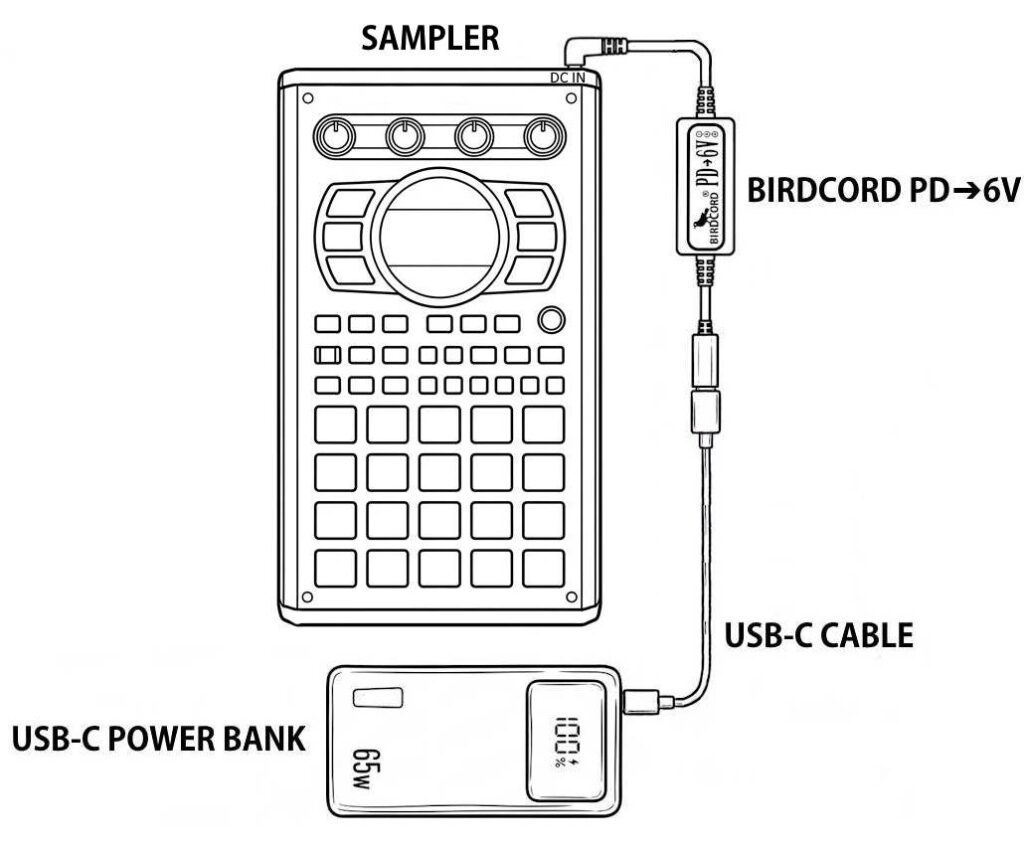
Roland SP-404MKII Creative Sampler and Effector powered portably with a USB-C power bank and a Birdcord PD→6V

How to Power the Roland SP-404MKII with a USB-C Power Bank

The Roland SP-404MKII Sampler can be powered from a USB-C power bank using a Birdcord PD➔6V power cable. The setup diagram below shows how to connect the devices for portable operation without a mains outlet, for example, when making music outdoors, travelling by train, or just sitting on the couch.

Roland SP-404MKII Creative Sampler and Effector powered portably with a USB-C power bank and a Birdcord PD→6V

Quick Facts: Roland SP-404MKII Mobile Setup

DeviceRoland SP-404MKII
Supply voltage5.7-6 V DC
Current drawmax. 1.1 A
Power consumptionmax. 6.6 W
Connector5.5 x 2.1 mm
PolarityCenter negative
Power sourceUSB-C power bank*
Compatible power converterBirdcord PD➔6V
StatusTested and verified

*Note: Use a USB-C power bank with USB Power Delivery (PD) and/or Quick Charge 4/4+ support. The power rating should be higher than the power consumption.

What You Need

✅ Birdcord PD➔6V – A compact USB-C power cable that requests 9 V output from a compatible USB-C power bank, converts it to 6 V, and delivers it to the Roland SP-404MKII. View product

✅ USB-C Power Bank – A power bank that supports USB Power Delivery (PD) and/or Quick Charge 4/4+. A minimum rating of 18 W and 10,000 mAh is recommended. Recommended: INIU 65 W 20,000 mAh USB-C PD Power Bank

✅ USB-C cable – To connect the power bank to the Birdcord PD➔6V (usually included with the power bank). View product

How It Works

The Roland SP-404MKII requires a DC power supply in the 5.7-6 V range. USB-C power banks typically provide 5 V by default, so a compatible voltage converter is needed to obtain the required voltage.

The Birdcord PD➔6V negotiates a 9V DC output with a compatible USB-C power bank and converts it to 6 V DC for the SP-404MKII.

Connect the Birdcord PD➔6V to the power bank using a USB-C cable, then plug the DC connector into the SP-404MKII. The setup works exactly like using the original power adapter, but gives you the freedom to create music anywhere.

Frequently Asked Questions (FAQ)

How long can it run on a USB-C power bank?

With a standard 20,000 mAh (74 Wh) power bank, the Roland SP-404MKII will run for over 11 hours of continuous use under typical operating conditions.

Will my existing power bank work?

Yes, as long as it supports 9 V output. You can easily check this by looking at the technical specifications printed in small letters on your power bank. If you see an output listing like 9V=2A, 9V=3A (or anything similar), it is compatible and will work perfectly. If it only lists 5V, it is not compatible.

Will this setup introduce any ground loop noise or hum?

No. Since your Roland SP-404MKII is completely disconnected from the mains grid and runs on isolated battery power, you actually eliminate ground-loop hum. It is one of the quietest ways to power your gear.

What’s the advantage of this setup over powering the SP-404MKII directly via USB-C?

The main advantage is that the SP-404MKII’s USB-C port remains available for audio, MIDI, and data connections while the device is powered through its DC input. This also keeps the power and data connections separate (to avoid noise).

Can this power setup damage my SP-404MKII?

No. We thoroughly tested this setup and monitored the SP-404MKII’s voltage regulator temperature throughout testing. The Birdcord PD➔6V supplies a slightly higher voltage than the original PSD power adapter. Our tests confirmed that the SP-404MKII works reliably with this setup.

Roland MC-707 Groovebox powered portably with a USB-C power bank and a Birdcord PD→6V

How to Power the Roland MC-707 with a USB-C Power Bank

The Roland MC-707 Groovebox can be powered from a USB-C power bank using a Birdcord PD➔6V power cable. The setup diagram below shows how to connect the devices for portable operation without a mains outlet, for example when making music outdoors, travelling by train, or just sitting on the couch.

Roland MC-707 Groovebox powered portably with a USB-C power bank and a Birdcord PD→6V

Quick Facts: Roland MC-707 Mobile Setup

DeviceRoland MC-707
Supply voltage5.7-6 V DC
Current drawmax. 2.0 A
Power consumptionmax. 12 W
Connector5.5 x 2.1 mm
PolarityCenter negative
Power sourceUSB-C power bank*
Compatible power converterBirdcord PD➔6V
StatusTested and verified

*Note: Use a USB-C power bank with USB Power Delivery (PD) and/or Quick Charge 4/4+ support. The power rating should be higher than the power consumption.

What You Need

✅ Birdcord PD➔6V – A compact USB-C power cable that requests 9 V output from a compatible USB-C power bank, converts it to 6 V, and delivers it to the Roland MC-707. View product

✅ USB-C Power Bank – A power bank that supports USB Power Delivery (PD) and/or Quick Charge 4/4+. A minimum rating of 18 W and 10,000 mAh is recommended. Recommended: INIU 65 W 20,000 mAh USB-C PD Power Bank

✅ USB-C cable – To connect the power bank to the Birdcord PD➔6V (usually included with the power bank). View product

How It Works

The Roland MC-707 requires a DC power supply in the 5.7-6 V range. USB-C power banks typically provide 5 V by default, so a compatible voltage converter is needed to obtain the required voltage.

The Birdcord PD➔6V negotiates a 9V DC output with a compatible USB-C power bank and converts it to 6 V DC for the MC-707.

Connect the Birdcord PD➔6V to the power bank using a USB-C cable, then plug the DC connector into the MC-707. The setup works exactly like using the original power adapter, but gives you the freedom to create music anywhere.

Frequently Asked Questions (FAQ)

How long can it run on a USB-C power bank?

With a standard 20,000 mAh (74 Wh) power bank, the Roland MC-707 will run for over 6 hours of continuous use under typical operating conditions.

Will my existing power bank work?

Yes, as long as it supports 9 V output. You can easily check this by looking at the technical specifications printed in small letters on your power bank. If you see an output listing like 9V=2A, 9V=3A (or anything similar), it is compatible and will work perfectly. If it only lists 5V, it is not compatible.

Will this setup introduce any ground loop noise or hum?

No. Since your Roland MC-707 is completely disconnected from the mains grid and runs on isolated battery power, you actually eliminate ground-loop hum. It is one of the quietest ways to power your gear.

Can I power other equipment from the same power bank?

Potentially, yes, provided the power bank has suitable outputs to meet the power requirements of all connected devices. You can usually find the output specifications printed in small letters on the back of the power bank.

Can this power setup damage my MC-707?

No. We thoroughly tested this setup and monitored the MC-707’s voltage regulator temperature throughout testing. The Birdcord PD➔6V supplies a slightly higher voltage than the original PSD power adapter. Our tests confirmed that the MC-707 works reliably with this setup.

How to Power the Elektron Digitakt II with a USB-C Power Bank

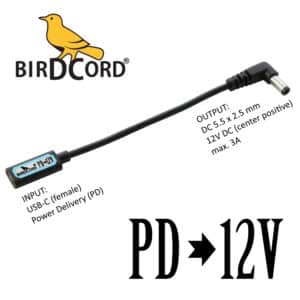
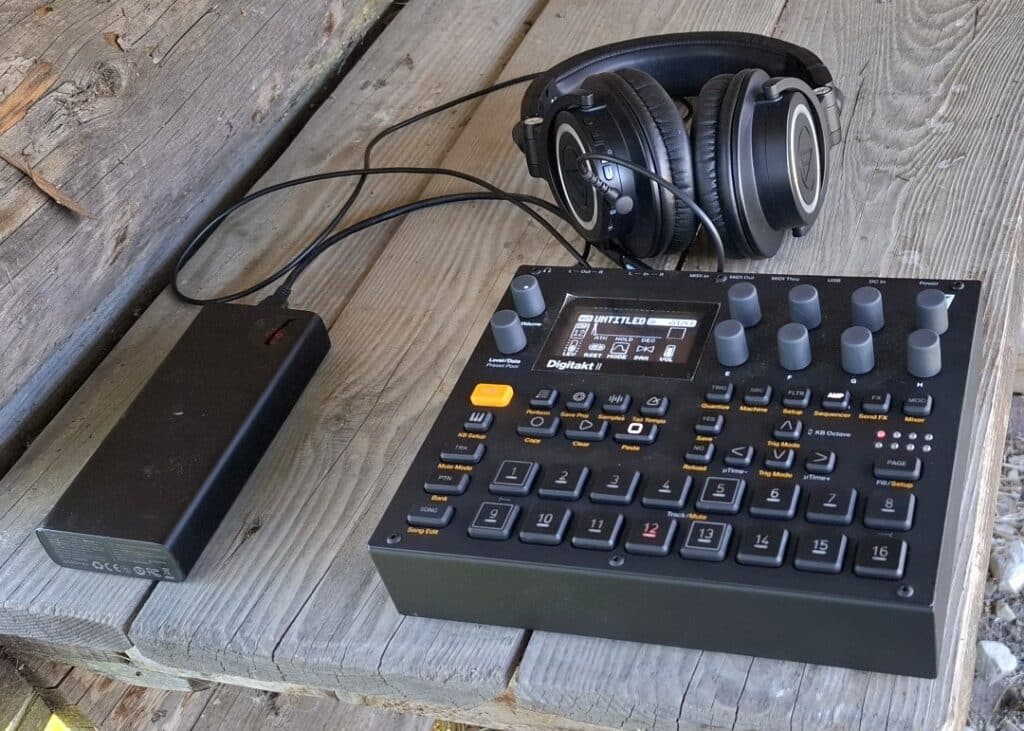
Manfred from Switzerland shared a photo of his portable Elektron Digitakt II setup, powered by a USB-C power bank using a Birdcord PD➔12V power cable. This setup allows him to create music outside without the need for a mains outlet.

Elektron Digitakt II groovebox powered portably with a USB-C power bank and a Birdcord PD 12V
Manfred uses a Birdcord PD➔12V to power his Elektron Digitakt II from a USB-C power bank during outdoor sessions.

Quick Facts: Elektron Digitakt II Mobile Setup

DeviceElektron Digitakt II
Supply voltage12 V DC
Current drawmax. 1 A
Power consumptionmax. 12 W
Connector5.5 x 2.5 mm
PolarityCenter positive
Power sourceUSB-C power bank*
Compatible power converterBirdcord PD➔12V
StatusTested and verified

*Note: Requires a USB-C power bank with USB Power Delivery (PD) support and a 12V output profile. The power rating should be higher than the power consumption.

What You Need

✅ Birdcord PD➔12V – A compact USB-C power cable that requests 12 V output from a compatible USB-C power bank and delivers it to the Elektron Digitakt II. View product

✅ USB-C Power Bank – A power bank that supports USB Power Delivery (PD) and a 12V output profile. A minimum rating of 24 W and 10,000 mAh is recommended. Recommended: INIU 65 W 20,000 mAh USB-C PD Power Bank

✅ USB-C cable – To connect the power bank to the Birdcord PD➔12V (usually included with the power bank). View product

How It Works

The Elektron Digitakt II requires a stable 12 V DC power supply. Since USB-C power banks don’t automatically provide the correct voltage, a Birdcord PD➔12V is needed to communicate with the power bank and request the right output voltage. The power bank then provides 12V DC, allowing the Elektron Digitakt II to run directly from a portable battery.

Simply connect the Birdcord PD➔12V to a compatible USB-C PD power bank and plug the DC connector into the Elektron Digitakt II. The setup works exactly like using the original power adapter, but gives you the freedom to perform anywhere.

Frequently Asked Questions (FAQ)

How long can the Elektron Digitakt II run on a USB-C power bank?

A 20,000 mAh USB-C power bank can typically power the Elektron Digitakt II for 8 hours of continuous use.

I already have a power bank. Will it work?

Yes, as long as it supports 12 V output. You can easily check this by looking at the technical specifications printed in small letters on your power bank. If you see an output listing like 12V=2A, 12V=3A (or anything similar), it is compatible and will work perfectly. If it only lists 5V, it is not compatible.

Can I power the Elektron Digitakt II directly from USB-C?

No. The Elektron Digitakt II requires 12 V DC power and cannot be powered directly from a standard USB-C output. A Birdcord PD➔12V is required to request the correct voltage from a compatible USB-C power bank.

How to choose a USB-C power bank for the Elektron Digitakt II?

Choose a USB-C power bank with USB Power Delivery (PD) support and a 12 V output profile. Please note that not all USB PD power banks support 12 V output.

To check compatibility, look at the technical specifications of the power bank. The supported output voltages are usually listed as something like 5V=3A, 9V=3A, 12V=2.25A or similar. If 12V is listed as an output option, the power bank is compatible with the Birdcord PD➔12V.

A capacity of 10,000 mAh or higher and a power output of 24 W or higher are recommended for a reliable portable setup.

How to Power the BOSS RC-505 MKII with a USB-C Power Bank

Curtis from Canada recently shared his portable setup showing his BOSS RC-505 MKII powered by a USB-C power bank using a Birdcord PD➔9V power cable. This setup allows him to use his looper without a mains outlet, making it ideal for outdoor performances and practice sessions on the go.

Boss RC-505 MKII loopstation powered portably with a USB-C power bank and a Birdcord PD 9V
Curtis uses a Birdcord PD➔9V to run his BOSS RC-505 MKII from a USB-C power bank during outdoor sessions.

Quick Facts: BOSS RC-505 MKII Mobile Setup

DeviceBOSS RC-505 MKII
Supply voltage9 V DC
Current drawmax. 1.0 A
Power consumptionmax. 9 W
Connector5.5 x 2.1 mm
PolarityCenter negative
Power sourceUSB-C power bank*
Compatible power converterBirdcord PD➔9V
StatusTested and verified

*Note: Use a USB-C power bank with USB Power Delivery (PD) and/or Quick Charge 4/4+ support. The power rating should be higher than the power consumption.

What You Need

✅ Birdcord PD➔9V – A compact USB-C power cable that requests 9 V output from a compatible USB-C power bank and delivers it to the BOSS RC-505 MKII. View product

✅ USB-C Power Bank – A power bank that supports USB Power Delivery (PD) and/or Quick Charge 4/4+. A minimum rating of 18 W and 10,000 mAh is recommended. Recommended: INIU 65 W 20,000 mAh USB-C PD Power Bank

✅ USB-C cable – To connect the power bank to the Birdcord PD➔9V (usually included with the power bank). View product

How It Works

The BOSS RC-505 MKII requires a stable 9 V DC power supply. Since USB-C power banks don’t automatically provide the correct voltage, a Birdcord PD➔9V is needed to communicate with the power bank and request the right output voltage. The power bank then provides 9V DC, allowing the BOSS RC-505 MKII to run directly from a portable battery.

Simply connect the Birdcord PD➔9V to a USB-C power bank and plug the DC connector into the RC-505 MKII. The setup works exactly like using the original power adapter, but gives you the freedom to perform anywhere.

Frequently Asked Questions (FAQ)

How long can it run on a USB-C power bank?

With a standard 20,000 mAh (74 Wh) power bank, the BOSS RC-505 MKII will run for over 6.5 hours of continuous use.

I already have a power bank. Will it work?

Yes, as long as it supports 9 V output. You can easily check this by looking at the technical specifications printed in small letters on your power bank. If you see an output listing like 9V=2A, 9V=3A (or anything similar), it is compatible and will work perfectly. If it only lists 5V, it is not compatible.

Will this setup introduce any ground loop noise or hum?

No, quite the opposite! Since your BOSS RC-505 MKII is completely disconnected from the mains grid and runs on isolated battery power, you actually eliminate ground loop hum entirely. It is one of the quietest ways to power your rig.

Can I still use 48 V phantom power for my microphones?

Yes, the BOSS RC-505 MKII will still provide 48 V phantom power to your condenser microphones.

various retro game consoles with a portable birdcord voltage converter plus power bank in front sega mega drive 2 3 nintendo nes snes

How to Power Your Retro Gaming Consoles Anywhere

Playing classic games on original hardware is a nostalgic experience, but dealing with bulky, outdated power adapters can be frustrating. The Birdcord PD➔9V (USB PD Voltage Converter) is a modern, portable power solution for your Nintendo NES, SNES, and Sega Mega Drive 2 & 3, allowing you to power your consoles anywhere using a USB-PD charger or power bank.

Why Use Birdcord?

By switching to Birdcord, you can:

🧳 Power your console anywhere – at home, in a car, or outdoors with a power bank
❄️ Reduce overheating – a lower and more stable voltage prevents excess heat buildup and potential long-term damage to your console’s internal components
📺 Eliminate screen noise – clean power minimizes interference for better visuals
🔌 Get rid of bulky adapters – replace heavy, outdated power bricks with a compact USB solution
⏱️ Power your consoles for hours – the recommended 20.000mAh battery will last for more than 7 hours

What You Need

For Nintendo NES & SNES

✅ Birdcord PD ➔ 9V – A compact USB-C to 9V power cable that converts USB Power Delivery (PD) into the voltage your NES and SNES need.
✅ USB PD Power Bank – A power bank that supports the fast charging standard PD (=Power Delivery). Best choice: Baseus 65W 20000mAh PD
✅ USB-C cable – To connect the power bank to the Birdcord (usually included with the power bank)

Nintendo SNES Super Famicom powered via USB power bank using a birdcord pd9v a usb-c cable and a usb pd power bank. pd stands for power delivery.

For Sega Mega Drive 2 & 3

✅ Birdcord PD ➔ 9V – A compact USB-C to 9V power cable that converts USB Power Delivery (PD) into the voltage your NES and SNES need.
✅ 9V Korg/Casio Adapter Cable – Originally intended for Korg and Casio pianos, this little adapter cable fits perfectly into the DC jack of your Sega Mega Drive consoles to make it compatible with the Birdcord PD➔9V
✅ USB PD Power Bank – A power bank that supports the fast charging standard PD (=Power Delivery). Best choice: Baseus 65W 20000mAh PD
✅ USB-C cable – To connect the power bank to the Birdcord (usually included with the power bank)

sega mega drive 3 or genesis 3 powered via usb power delivery (pd) power bank. portable setup using birdcord voltage converter cables. pd9V

Get Your Birdcord Today!

Ditch outdated power bricks and upgrade to modern, portable power for your retro gaming setup. Order your Birdcord PD➔9V, 9V Korg/Casio Adapter Cable, and USB-C Cable now and play your favorite retro games anytime, anywhere!

Feel free to share and discuss this post with your gaming community and let me know if you have any questions (dieter@songbirdfx.com). Be part of the future of retro gaming power!

How to Power Pioneer DJ Toraiz SP-16 with a USB Power Bank

The Pioneer DJ Toraiz SP-16 is a powerful professional sampler and step sequencer, loved by producers and live performers alike. But like many high-end music devices, it typically requires a dedicated power adapter – which can be inconvenient when you’re on the go.

Luckily, there’s a simple way to power the Toraiz SP-16 from a USB power bank using the Birdcord PD ➔ 12V USB power cable and a 5mm Adapter from Songbird FX. Here’s how you can set up a portable and reliable power solution for your Toraiz SP-16.

Pioneer DJ Toraiz SP-16 USB Power PD Power Delivery Birdcord 12V Portable Battery Bank

What You Need

✅ Birdcord PD ➔ 12V – A compact USB-C to 12V power cable that converts USB Power Delivery (PD) into the voltage your Toraiz SP-16 needs.
✅ USB PD Power Bank – A power bank that supports 12V output via USB-C PD (minimum 36W). Best choice: Baseus 65W 20000mAh PD
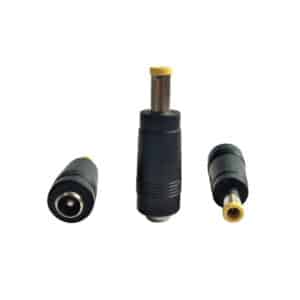
✅ 5mm Adapter – To make the Birdcord fit into the Toraiz SP-16’s DC jack.
✅ USB-C cable – To connect the power bank to the Birdcord (usually included with the power bank)

How to Set It Up

  1. Connect the Birdcord PD ➔ 12V to your USB PD power bank using a USB-C cable
  2. Attach the 5mm adapter to the Birdcord’s output plug
  3. Power up your Toraiz SP-16 – Switch on your Toraiz SP-16 and, if needed, push the power button on your power bank

Within seconds, your sampler is powered up and ready to go – no need for wall sockets!

Why This Setup Is a Game Changer

🔋 Portable & Stage-Ready – Perform anywhere without worrying about power outlets.
🔌 Clean Setup – No bulky power bricks, just a simple cable solution.
⏱️ Power for Hours – the recommended 20.000mAh battery will last for more than 4 hours
🌍 Great for Travel – Ideal for DJs and producers who need a lightweight and efficient power solution.

Get Yours Today!

The Birdcord PD ➔ 12V, the necessary 5mm Adapter, and a simple USB-C cable are all you need to power your Pioneer DJ Toraiz SP-16 from a USB power bank. Say goodbye to power limitations and take your sampler setup fully mobile!

If you have any questions, feel free to get in touch via email (dieter@songbirdfx.com) or Instagram.

Power Your Hologram Microcosm on the Go: A Complete Guide

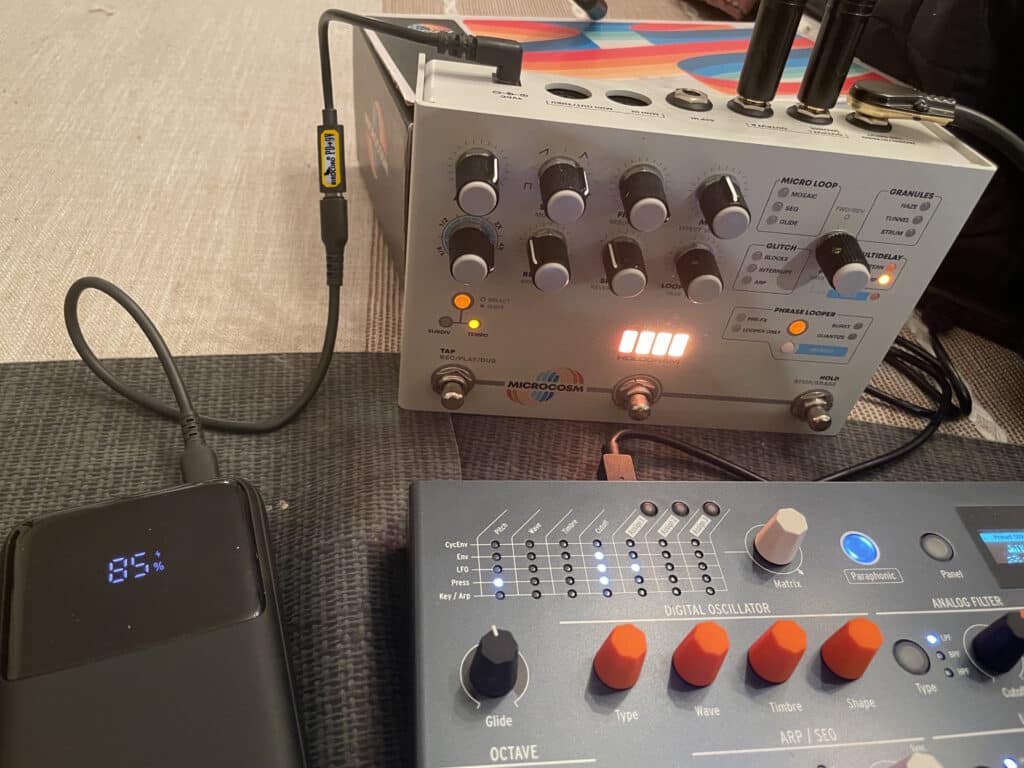
The Hologram Microcosm effects pedal is celebrated for its ability to produce rich, dynamic soundscapes, but powering it on the go can be a challenge. With a USB PD power bank and a Birdcord PD➔9V USB power cable, you can create a reliable and portable power setup that frees you from traditional outlets.

This guide will walk you through setting up a portable power solution for your Microcosm pedal.

hologram microcosm effects pedal powered via usb power delivery thanks to birdcord pd 9v voltage converter cable
Mobile power setup in action: Powering the Microcosm pedal from a USB power bank.

What You’ll Need

  1. USB PD Power Bank
    Choose a USB power bank with Power Delivery (PD) functionality. Popular brands include INIU and Baseus.
  2. Birdcord PD➔9V (USB PD Voltage Converter)
    This specialized cable converts the USB PD output from your power bank into a stable 9V DC signal, compatible with effects pedals like the Microcosm.
  3. USB-C cable
    For connecting the Birdcord with the power bank. It’s usually included with the power bank.
  4. Hologram Microcosm Pedal
    Of course.

Step-by-Step Guide to Powering the Microcosm on the Go

  1. Connect Everything
    Connect the female USB-C end of the Birdcord with your power bank using a USB-C cable. Then connect the barrel plug end of the Birdcord with the Microcosm – Easy!
  2. Power On
    If it doesn’t turn on automatically, press the button on the power bank to switch it on.
  3. Play Your Music
    Now you can play your music for many hours.
  4. Power Off
    To power off, simply disconnect the Birdcord from the USB-C cable.

Why This Setup Is Perfect for the Hologram Microcosm

  • Portability: A USB PD battery allows you to use the Microcosm anywhere—on stage, in the studio, or outdoors.
  • Compatibility: The Birdcord PD➔9V cable is designed specifically to power effects pedals, ensuring stable and reliable operation.
  • Versatility: This setup powers not only the Microcosm but also other pedals with similar 9V DC requirements.

FAQs About Powering the Microcosm on the Go

  1. Can I use any USB power bank?
    No, the power bank must support USB PD.
  2. Is the Birdcord cable reliable?
    Yes, the Birdcord PD➔9V cable is specifically designed for effects pedals and delivers consistent, noise-free power.
  3. Does this setup work with other pedals?
    Yes, it’s compatible with most 9V DC pedals that use a center-negative configuration.
  4. How long will the battery last?
    A 10.000mAh USB PD power bank typically provides around 9 hours of portable power.

Conclusion

Powering your Hologram Microcosm on the go is easy and reliable with a USB PD power bank and a Birdcord PD➔9V cable. This setup provides a practical solution for musicians who want the flexibility of using a portable battery instead of being tied to traditional power outlets.

With this portable power option, you can focus on crafting the stunning soundscapes the Microcosm is known for—wherever inspiration strikes.