Blog

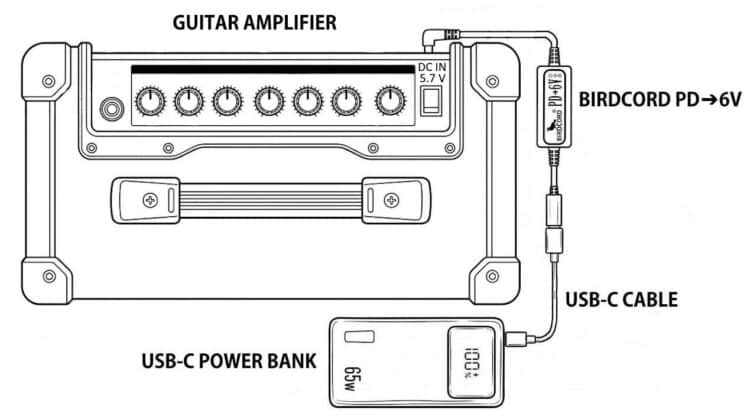
Roland CUBE-10GX Guitar Amplifier powered portably with a USB-C power bank and a Birdcord PD→6V

How to Power the Roland CUBE-10GX with a USB-C Power Bank

The Roland CUBE-10GX Guitar Amplifier can be powered from a USB-C power bank using a Birdcord PD➔6V power cable. The setup diagram below shows how to connect the devices for portable operation without a mains outlet, for example when playing music in your garden or for busking on the streets.
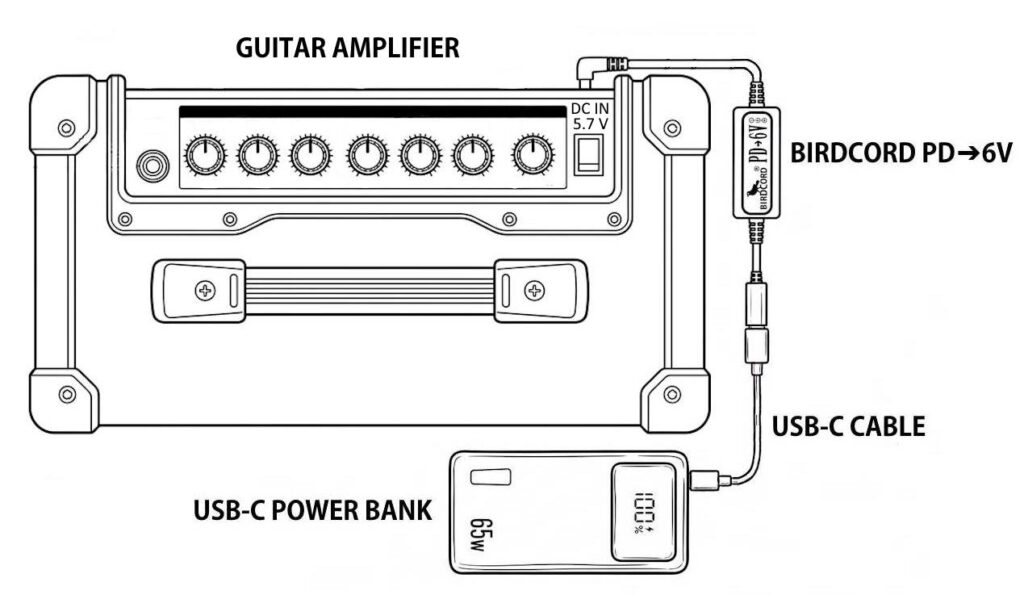
Roland CUBE-10GX Guitar Amplifier powered portably with a USB-C power bank and a Birdcord PD→6V

Quick Facts: Roland CUBE-10GX Mobile Setup

DeviceRoland CUBE-10GX
Supply voltage5.7-6 V DC
Current draw0.7 A
Power consumption4.2 W
Connector5.5 x 2.1 mm
PolarityCenter negative
Power sourceUSB-C power bank*
Compatible power converterBirdcord PD➔6V
StatusTested and verified

*Note: Use a USB-C power bank with USB Power Delivery (PD) and/or Quick Charge 4/4+ support. The power rating should be higher than the power consumption.

What You Need

✅ Birdcord PD➔6V – A compact USB-C power cable that requests 9 V output from a compatible USB-C power bank, converts it to 6 V, and delivers it to the Roland CUBE-10GX. View product

✅ USB-C Power Bank – A power bank that supports USB Power Delivery (PD) and/or Quick Charge 4/4+. A minimum rating of 18 W and 10,000 mAh is recommended. Recommended: INIU 65 W 20,000 mAh USB-C PD Power Bank

✅ USB-C cable – To connect the power bank to the Birdcord PD➔6V (usually included with the power bank). View product

How It Works

The Roland CUBE-10GX requires a DC power supply in the 5.7-6 V range. USB-C power banks typically provide 5 V by default, so a compatible voltage converter is needed to obtain the required voltage.

The Birdcord PD➔6V negotiates a 9V DC output with a compatible USB-C power bank and converts it to 6 V DC for the CUBE-10GX.

Connect the Birdcord PD➔6V to the power bank using a USB-C cable, then plug the DC connector into the CUBE-10GX. The setup works exactly like using the original power adapter, but gives you the freedom to create music anywhere.

Frequently Asked Questions (FAQ)

How long can it run on a USB-C power bank?

With a standard 20,000 mAh (74 Wh) power bank, the Roland CUBE-10GX will run for over 14 hours of continuous use under typical operating conditions.

Will my existing power bank work?

Yes, as long as it supports 9 V output. You can easily check this by looking at the technical specifications printed in small letters on your power bank. If you see an output listing like 9V=2A, 9V=3A (or anything similar), it is compatible and will work perfectly. If it only lists 5V, it is not compatible.

Will this setup introduce any ground loop noise or hum?

No. Since your Roland CUBE-10GX is completely disconnected from the mains grid and runs on isolated battery power, you actually eliminate ground-loop hum. It is one of the quietest ways to power your gear.

Can I power other equipment from the same power bank?

Potentially, yes, provided the power bank has suitable outputs to meet the power requirements of all connected devices. You can usually find the output specifications printed in small letters on the back of the power bank.

Can this power setup damage my CUBE-10GX?

No. We thoroughly tested this setup and monitored the CUBE-10GX’s voltage regulator temperature throughout testing. The Birdcord PD➔6V supplies a slightly higher voltage than the original PSD power adapter. Our tests confirmed that the CUBE-10GX works reliably with this setup.
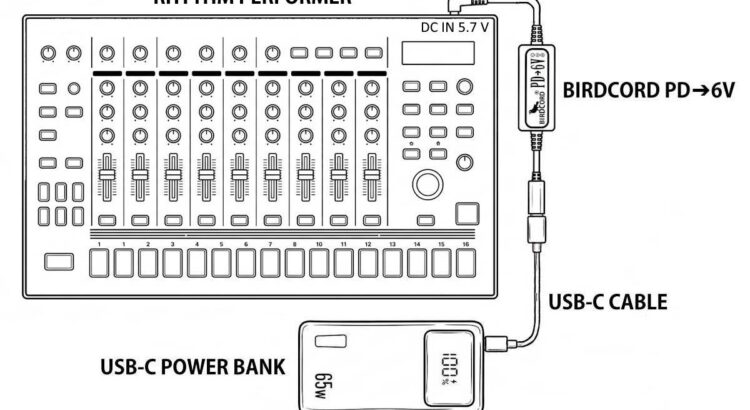
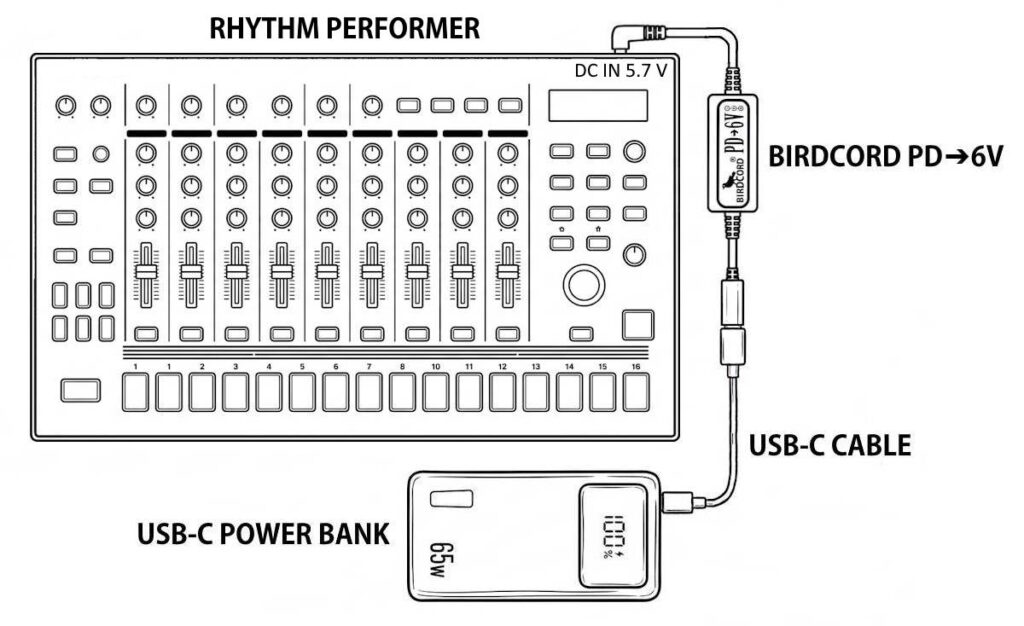
Roland TR-8S Rhythm Performer powered portably with a USB-C power bank and a Birdcord PD→6V

How to Power the Roland TR-8S with a USB-C Power Bank

The Roland TR-8S Rhythm Performer can be powered from a USB-C power bank using a Birdcord PD➔6V power cable. The setup diagram below shows how to connect the devices for portable operation without a mains outlet, for example when making music outdoors, travelling by train, or just sitting on the couch.

Roland TR-8S Rhythm Performer powered portably with a USB-C power bank and a Birdcord PD→6V

Quick Facts: Roland TR-8S Mobile Setup

DeviceRoland TR-8S
Supply voltage5.7-6 V DC
Current drawmax. 2.0 A
Power consumptionmax. 12 W
Connector5.5 x 2.1 mm
PolarityCenter negative
Power sourceUSB-C power bank*
Compatible power converterBirdcord PD➔6V
StatusTested and verified

*Note: Use a USB-C power bank with USB Power Delivery (PD) and/or Quick Charge 4/4+ support. The power rating should be higher than the power consumption.

What You Need

✅ Birdcord PD➔6V – A compact USB-C power cable that requests 9 V output from a compatible USB-C power bank, converts it to 6 V, and delivers it to the Roland TR-8S. View product

✅ USB-C Power Bank – A power bank that supports USB Power Delivery (PD) and/or Quick Charge 4/4+. A minimum rating of 18 W and 10,000 mAh is recommended. Recommended: INIU 65 W 20,000 mAh USB-C PD Power Bank

✅ USB-C cable – To connect the power bank to the Birdcord PD➔6V (usually included with the power bank). View product

How It Works

The Roland TR-8S requires a DC power supply in the 5.7-6 V range. USB-C power banks typically provide 5 V by default, so a compatible voltage converter is needed to obtain the required voltage.

The Birdcord PD➔6V negotiates a 9V DC output with a compatible USB-C power bank and converts it to 6 V DC for the TR-8S.

Connect the Birdcord PD➔6V to the power bank using a USB-C cable, then plug the DC connector into the TR-8S. The setup works exactly like using the original power adapter, but gives you the freedom to create music anywhere.

Frequently Asked Questions (FAQ)

How long can it run on a USB-C power bank?

With a standard 20,000 mAh (74 Wh) power bank, the Roland TR-8S will run for over 6 hours of continuous use under typical operating conditions.

Will my existing power bank work?

Yes, as long as it supports 9 V output. You can easily check this by looking at the technical specifications printed in small letters on your power bank. If you see an output listing like 9V=2A, 9V=3A (or anything similar), it is compatible and will work perfectly. If it only lists 5V, it is not compatible.

Will this setup introduce any ground loop noise or hum?

No. Since your Roland TR-8S is completely disconnected from the mains grid and runs on isolated battery power, you actually eliminate ground-loop hum. It is one of the quietest ways to power your gear.

Can I power other equipment from the same power bank?

Potentially, yes, provided the power bank has suitable outputs to meet the power requirements of all connected devices. You can usually find the output specifications printed in small letters on the back of the power bank.

Can this power setup damage my TR-8S?

No. We thoroughly tested this setup and monitored the TR-8S’s voltage regulator temperature throughout testing. The Birdcord PD➔6V supplies a slightly higher voltage than the original PSD power adapter. Our tests confirmed that the TR-8S works reliably with this setup.
Roland JD-Xi Synthesizer powered portably with a USB-C power bank and a Birdcord PD→6V

How to Power the Roland JD-Xi with a USB-C Power Bank

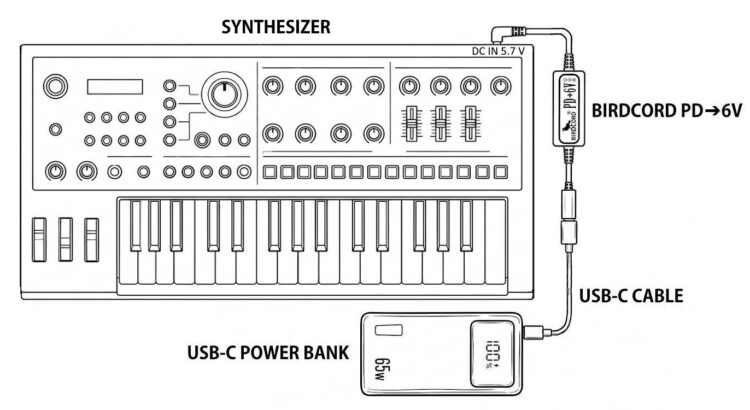
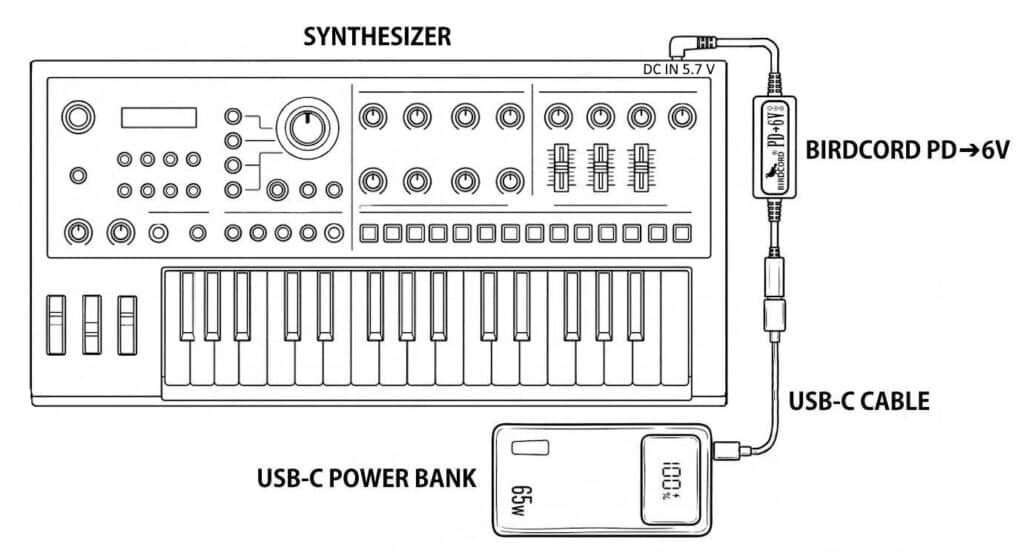
The Roland JD-Xi Synthesizer can be powered from a USB-C power bank using a Birdcord PD➔6V power cable. The setup diagram below shows how to connect the devices for portable operation without a mains outlet, for example when making music outdoors, travelling by train, or just sitting on the couch.

Roland JD-Xi Synthesizer powered portably with a USB-C power bank and a Birdcord PD→6V

Quick Facts: Roland JD-Xi Mobile Setup

DeviceRoland JD-Xi
Supply voltage5.7-6 V DC
Current draw1.0 A
Power consumption6 W
Connector5.5 x 2.1 mm
PolarityCenter negative
Power sourceUSB-C power bank*
Compatible power converterBirdcord PD➔6V
StatusTested and verified

*Note: Use a USB-C power bank with USB Power Delivery (PD) and/or Quick Charge 4/4+ support. The power rating should be higher than the power consumption.

What You Need

✅ Birdcord PD➔6V – A compact USB-C power cable that requests 9 V output from a compatible USB-C power bank, converts it to 6 V, and delivers it to the Roland JD-Xi. View product

✅ USB-C Power Bank – A power bank that supports USB Power Delivery (PD) and/or Quick Charge 4/4+. A minimum rating of 18 W and 10,000 mAh is recommended. Recommended: INIU 65 W 20,000 mAh USB-C PD Power Bank

✅ USB-C cable – To connect the power bank to the Birdcord PD➔6V (usually included with the power bank). View product

How It Works

The Roland JD-Xi requires a DC power supply in the 5.7-6 V range. USB-C power banks typically provide 5 V by default, so a compatible voltage converter is needed to obtain the required voltage.

The Birdcord PD➔6V negotiates a 9V DC output with a compatible USB-C power bank and converts it to 6 V DC for the JD-Xi.

Connect the Birdcord PD➔6V to the power bank using a USB-C cable, then plug the DC connector into the JD-Xi. The setup works exactly like using the original power adapter, but gives you the freedom to create music anywhere.

Frequently Asked Questions (FAQ)

How long can it run on a USB-C power bank?

With a standard 20,000 mAh (74 Wh) power bank, the Roland JD-Xi will run for over 9 hours of continuous use under typical operating conditions.

Will my existing power bank work?

Yes, as long as it supports 9 V output. You can easily check this by looking at the technical specifications printed in small letters on your power bank. If you see an output listing like 9V=2A, 9V=3A (or anything similar), it is compatible and will work perfectly. If it only lists 5V, it is not compatible.

Will this setup introduce any ground loop noise or hum?

No. Since your Roland JD-Xi is completely disconnected from the mains grid and runs on isolated battery power, you actually eliminate ground-loop hum. It is one of the quietest ways to power your gear.

Can I power other equipment from the same power bank?

Potentially, yes, provided the power bank has suitable outputs to meet the power requirements of all connected devices. You can usually find the output specifications printed in small letters on the back of the power bank.

Can this power setup damage my JD-Xi?

No. We thoroughly tested this setup and monitored the JD-Xi’s voltage regulator temperature throughout testing. The Birdcord PD➔6V supplies a slightly higher voltage than the original PSD power adapter. Our tests confirmed that the JD-Xi works reliably with this setup.
Roland SP-404MKII Creative Sampler and Effector powered portably with a USB-C power bank and a Birdcord PD→6V

How to Power the Roland SP-404MKII with a USB-C Power Bank

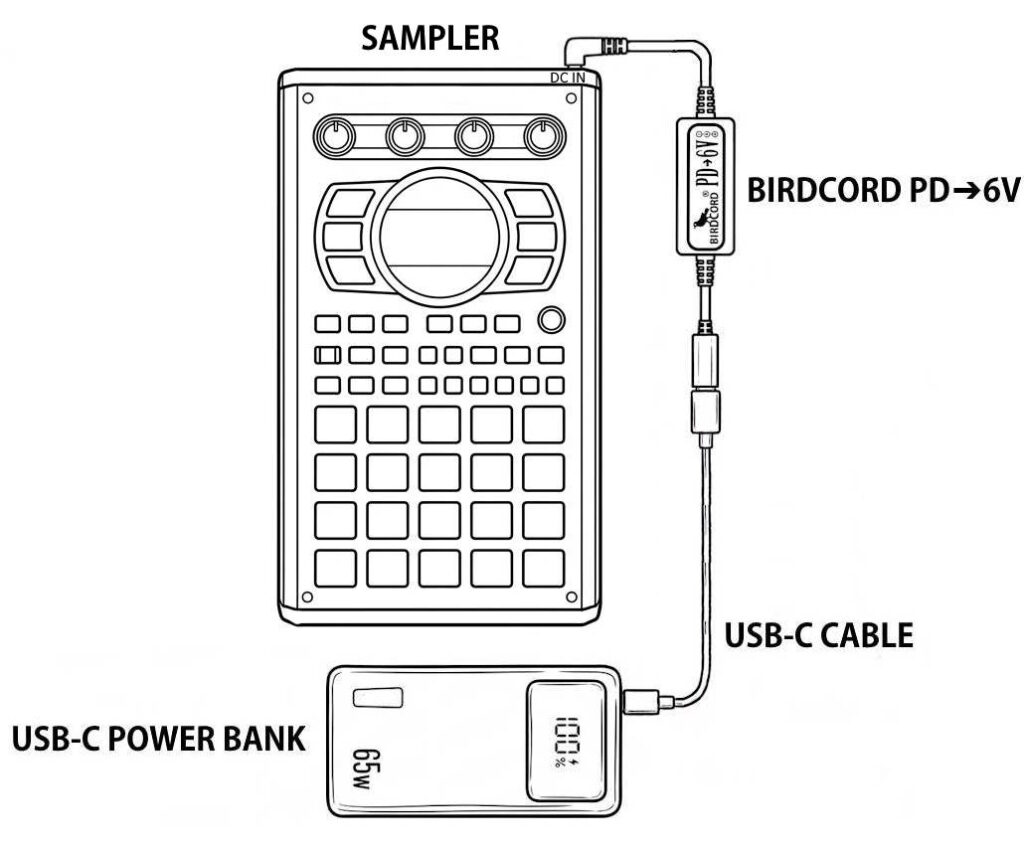
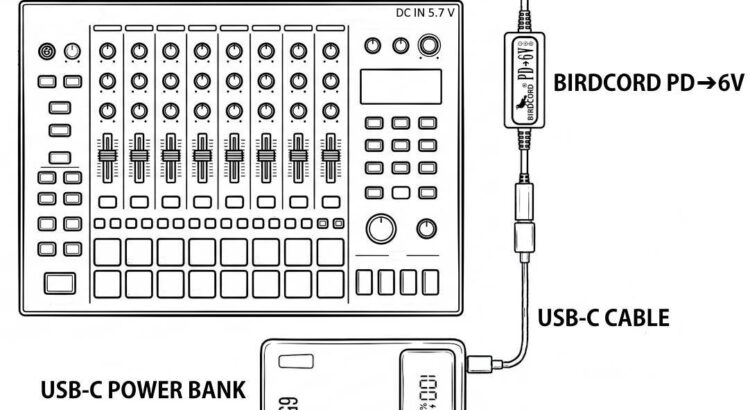
The Roland SP-404MKII Sampler can be powered from a USB-C power bank using a Birdcord PD➔6V power cable. The setup diagram below shows how to connect the devices for portable operation without a mains outlet, for example, when making music outdoors, travelling by train, or just sitting on the couch.

Roland SP-404MKII Creative Sampler and Effector powered portably with a USB-C power bank and a Birdcord PD→6V

Quick Facts: Roland SP-404MKII Mobile Setup

DeviceRoland SP-404MKII
Supply voltage5.7-6 V DC
Current drawmax. 1.1 A
Power consumptionmax. 6.6 W
Connector5.5 x 2.1 mm
PolarityCenter negative
Power sourceUSB-C power bank*
Compatible power converterBirdcord PD➔6V
StatusTested and verified

*Note: Use a USB-C power bank with USB Power Delivery (PD) and/or Quick Charge 4/4+ support. The power rating should be higher than the power consumption.

What You Need

✅ Birdcord PD➔6V – A compact USB-C power cable that requests 9 V output from a compatible USB-C power bank, converts it to 6 V, and delivers it to the Roland SP-404MKII. View product

✅ USB-C Power Bank – A power bank that supports USB Power Delivery (PD) and/or Quick Charge 4/4+. A minimum rating of 18 W and 10,000 mAh is recommended. Recommended: INIU 65 W 20,000 mAh USB-C PD Power Bank

✅ USB-C cable – To connect the power bank to the Birdcord PD➔6V (usually included with the power bank). View product

How It Works

The Roland SP-404MKII requires a DC power supply in the 5.7-6 V range. USB-C power banks typically provide 5 V by default, so a compatible voltage converter is needed to obtain the required voltage.

The Birdcord PD➔6V negotiates a 9V DC output with a compatible USB-C power bank and converts it to 6 V DC for the SP-404MKII.

Connect the Birdcord PD➔6V to the power bank using a USB-C cable, then plug the DC connector into the SP-404MKII. The setup works exactly like using the original power adapter, but gives you the freedom to create music anywhere.

Frequently Asked Questions (FAQ)

How long can it run on a USB-C power bank?

With a standard 20,000 mAh (74 Wh) power bank, the Roland SP-404MKII will run for over 11 hours of continuous use under typical operating conditions.

Will my existing power bank work?

Yes, as long as it supports 9 V output. You can easily check this by looking at the technical specifications printed in small letters on your power bank. If you see an output listing like 9V=2A, 9V=3A (or anything similar), it is compatible and will work perfectly. If it only lists 5V, it is not compatible.

Will this setup introduce any ground loop noise or hum?

No. Since your Roland SP-404MKII is completely disconnected from the mains grid and runs on isolated battery power, you actually eliminate ground-loop hum. It is one of the quietest ways to power your gear.

What’s the advantage of this setup over powering the SP-404MKII directly via USB-C?

The main advantage is that the SP-404MKII’s USB-C port remains available for audio, MIDI, and data connections while the device is powered through its DC input. This also keeps the power and data connections separate (to avoid noise).

Can this power setup damage my SP-404MKII?

No. We thoroughly tested this setup and monitored the SP-404MKII’s voltage regulator temperature throughout testing. The Birdcord PD➔6V supplies a slightly higher voltage than the original PSD power adapter. Our tests confirmed that the SP-404MKII works reliably with this setup.

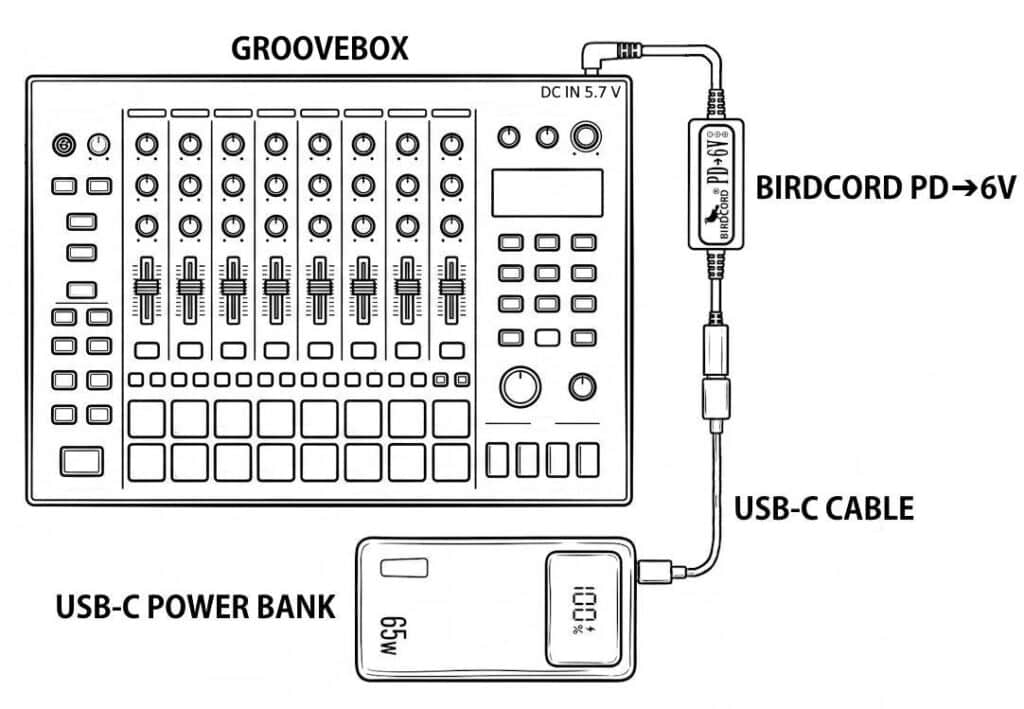
Roland MC-707 Groovebox powered portably with a USB-C power bank and a Birdcord PD→6V

How to Power the Roland MC-707 with a USB-C Power Bank

The Roland MC-707 Groovebox can be powered from a USB-C power bank using a Birdcord PD➔6V power cable. The setup diagram below shows how to connect the devices for portable operation without a mains outlet, for example when making music outdoors, travelling by train, or just sitting on the couch.

Roland MC-707 Groovebox powered portably with a USB-C power bank and a Birdcord PD→6V

Quick Facts: Roland MC-707 Mobile Setup

DeviceRoland MC-707
Supply voltage5.7-6 V DC
Current drawmax. 2.0 A
Power consumptionmax. 12 W
Connector5.5 x 2.1 mm
PolarityCenter negative
Power sourceUSB-C power bank*
Compatible power converterBirdcord PD➔6V
StatusTested and verified

*Note: Use a USB-C power bank with USB Power Delivery (PD) and/or Quick Charge 4/4+ support. The power rating should be higher than the power consumption.

What You Need

✅ Birdcord PD➔6V – A compact USB-C power cable that requests 9 V output from a compatible USB-C power bank, converts it to 6 V, and delivers it to the Roland MC-707. View product

✅ USB-C Power Bank – A power bank that supports USB Power Delivery (PD) and/or Quick Charge 4/4+. A minimum rating of 18 W and 10,000 mAh is recommended. Recommended: INIU 65 W 20,000 mAh USB-C PD Power Bank

✅ USB-C cable – To connect the power bank to the Birdcord PD➔6V (usually included with the power bank). View product

How It Works

The Roland MC-707 requires a DC power supply in the 5.7-6 V range. USB-C power banks typically provide 5 V by default, so a compatible voltage converter is needed to obtain the required voltage.

The Birdcord PD➔6V negotiates a 9V DC output with a compatible USB-C power bank and converts it to 6 V DC for the MC-707.

Connect the Birdcord PD➔6V to the power bank using a USB-C cable, then plug the DC connector into the MC-707. The setup works exactly like using the original power adapter, but gives you the freedom to create music anywhere.

Frequently Asked Questions (FAQ)

How long can it run on a USB-C power bank?

With a standard 20,000 mAh (74 Wh) power bank, the Roland MC-707 will run for over 6 hours of continuous use under typical operating conditions.

Will my existing power bank work?

Yes, as long as it supports 9 V output. You can easily check this by looking at the technical specifications printed in small letters on your power bank. If you see an output listing like 9V=2A, 9V=3A (or anything similar), it is compatible and will work perfectly. If it only lists 5V, it is not compatible.

Will this setup introduce any ground loop noise or hum?

No. Since your Roland MC-707 is completely disconnected from the mains grid and runs on isolated battery power, you actually eliminate ground-loop hum. It is one of the quietest ways to power your gear.

Can I power other equipment from the same power bank?

Potentially, yes, provided the power bank has suitable outputs to meet the power requirements of all connected devices. You can usually find the output specifications printed in small letters on the back of the power bank.

Can this power setup damage my MC-707?

No. We thoroughly tested this setup and monitored the MC-707’s voltage regulator temperature throughout testing. The Birdcord PD➔6V supplies a slightly higher voltage than the original PSD power adapter. Our tests confirmed that the MC-707 works reliably with this setup.

My Experience with TrueLang – Affordable WordPress Translation Plugin

I’ve recently switched my website from Polylang to TrueLang, and I wanted to share my experience. I’m not getting paid for this recommendation. I simply think it’s a useful tool that even small businesses can afford.

Affordable AI translation

TrueLang lets you use your own AI API or the TrueLang API, which even includes free starting credits. There are several models to choose from, and Google Gemini Flash 3.6 has worked particularly well for me.

The best part? Translating my entire website, including the WooCommerce webshop costs less than one dollar per language.

Of course, the actual cost depends on the size of your website and the model you choose.

On top of that, you have the price of the plugin itself, which starts at $99 USD. It’s worth mentioning that this is a lifetime license. Subscriptions are a deal-breaker for me.

Useful tools and flexibility

TrueLang comes with a few features that make managing translations easier:

  • TrueLang Editor and Page Translation: Manually adjust individual parts of your website.
  • Fix Gaps: Find and translate strings that haven’t been translated yet.
  • Translation styles: Choose between Neutral and Contextual, which takes your brand voice into account. I’m using the neutral style and am happy with it.

Switching from Polylang

The migration from Polylang was automatic, including redirects for URLs that were no longer in use. That saved me quite a bit of work.

My website has been around for about ten years and has a few peculiarities. Theo, the developer behind TrueLang, was incredibly helpful whenever I ran into issues.

His support is probably what impressed me most. He’s smart, friendly, hardworking, and genuinely takes the time to help.

My conclusion

TrueLang does what I need at a very reasonable price. For my particular website, it was not a completely hands-off process, but very close to it. Whenever I ran into issues, Theo would immediately help. I already rate Truelang 5/5 and it is still getting better every week.

I’m not earning anything from this recommendation. I simply had a good experience, and I think Theo deserves some credit for building a useful tool and being so helpful.

Check out Truelang here: https://truelang.io/

How to Power the Elektron Digitakt II with a USB-C Power Bank

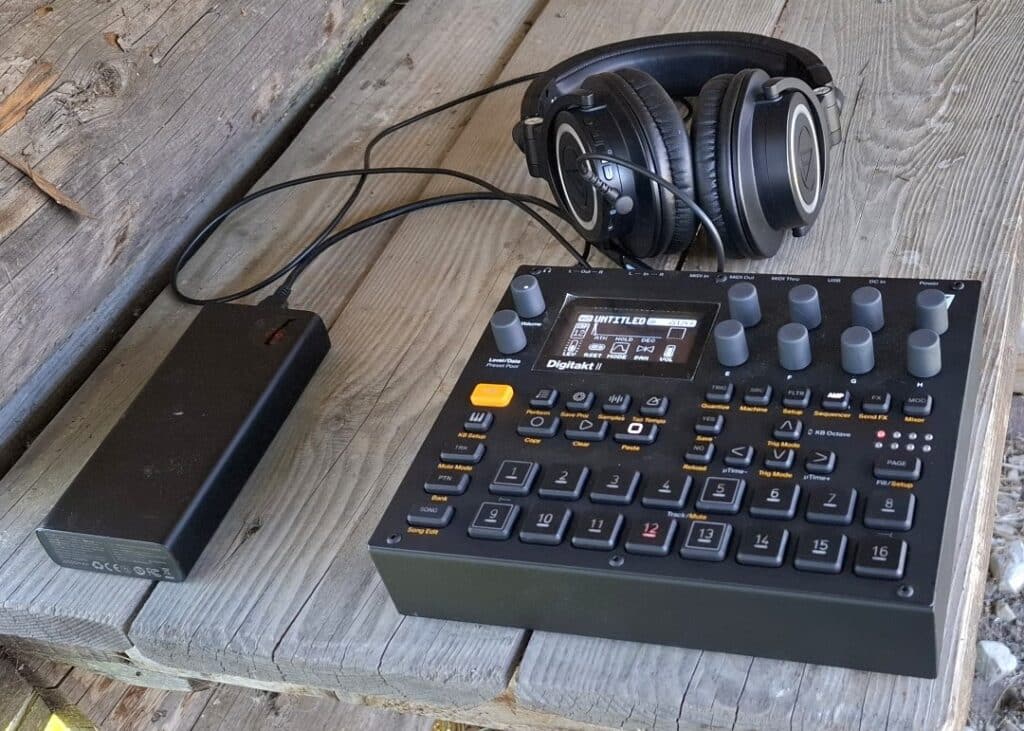
Manfred from Switzerland shared a photo of his portable Elektron Digitakt II setup, powered by a USB-C power bank using a Birdcord PD➔12V power cable. This setup allows him to create music outside without the need for a mains outlet.

Elektron Digitakt II groovebox powered portably with a USB-C power bank and a Birdcord PD 12V
Manfred uses a Birdcord PD➔12V to power his Elektron Digitakt II from a USB-C power bank during outdoor sessions.

Quick Facts: Elektron Digitakt II Mobile Setup

DeviceElektron Digitakt II
Supply voltage12 V DC
Current drawmax. 1 A
Power consumptionmax. 12 W
Connector5.5 x 2.5 mm
PolarityCenter positive
Power sourceUSB-C power bank*
Compatible power converterBirdcord PD➔12V
StatusTested and verified

*Note: Requires a USB-C power bank with USB Power Delivery (PD) support and a 12V output profile. The power rating should be higher than the power consumption.

What You Need

✅ Birdcord PD➔12V – A compact USB-C power cable that requests 12 V output from a compatible USB-C power bank and delivers it to the Elektron Digitakt II. View product

✅ USB-C Power Bank – A power bank that supports USB Power Delivery (PD) and a 12V output profile. A minimum rating of 24 W and 10,000 mAh is recommended. Recommended: INIU 65 W 20,000 mAh USB-C PD Power Bank

✅ USB-C cable – To connect the power bank to the Birdcord PD➔12V (usually included with the power bank). View product

How It Works

The Elektron Digitakt II requires a stable 12 V DC power supply. Since USB-C power banks don’t automatically provide the correct voltage, a Birdcord PD➔12V is needed to communicate with the power bank and request the right output voltage. The power bank then provides 12V DC, allowing the Elektron Digitakt II to run directly from a portable battery.

Simply connect the Birdcord PD➔12V to a compatible USB-C PD power bank and plug the DC connector into the Elektron Digitakt II. The setup works exactly like using the original power adapter, but gives you the freedom to perform anywhere.

Frequently Asked Questions (FAQ)

How long can the Elektron Digitakt II run on a USB-C power bank?

A 20,000 mAh USB-C power bank can typically power the Elektron Digitakt II for 8 hours of continuous use.

I already have a power bank. Will it work?

Yes, as long as it supports 12 V output. You can easily check this by looking at the technical specifications printed in small letters on your power bank. If you see an output listing like 12V=2A, 12V=3A (or anything similar), it is compatible and will work perfectly. If it only lists 5V, it is not compatible.

Can I power the Elektron Digitakt II directly from USB-C?

No. The Elektron Digitakt II requires 12 V DC power and cannot be powered directly from a standard USB-C output. A Birdcord PD➔12V is required to request the correct voltage from a compatible USB-C power bank.

How to choose a USB-C power bank for the Elektron Digitakt II?

Choose a USB-C power bank with USB Power Delivery (PD) support and a 12 V output profile. Please note that not all USB PD power banks support 12 V output.

To check compatibility, look at the technical specifications of the power bank. The supported output voltages are usually listed as something like 5V=3A, 9V=3A, 12V=2.25A or similar. If 12V is listed as an output option, the power bank is compatible with the Birdcord PD➔12V.

A capacity of 10,000 mAh or higher and a power output of 24 W or higher are recommended for a reliable portable setup.

How to Power the BOSS RC-505 MKII with a USB-C Power Bank

Curtis from Canada recently shared his portable setup showing his BOSS RC-505 MKII powered by a USB-C power bank using a Birdcord PD➔9V power cable. This setup allows him to use his looper without a mains outlet, making it ideal for outdoor performances and practice sessions on the go.

Boss RC-505 MKII loopstation powered portably with a USB-C power bank and a Birdcord PD 9V
Curtis uses a Birdcord PD➔9V to run his BOSS RC-505 MKII from a USB-C power bank during outdoor sessions.

Quick Facts: BOSS RC-505 MKII Mobile Setup

DeviceBOSS RC-505 MKII
Supply voltage9 V DC
Current drawmax. 1.0 A
Power consumptionmax. 9 W
Connector5.5 x 2.1 mm
PolarityCenter negative
Power sourceUSB-C power bank*
Compatible power converterBirdcord PD➔9V
StatusTested and verified

*Note: Use a USB-C power bank with USB Power Delivery (PD) and/or Quick Charge 4/4+ support. The power rating should be higher than the power consumption.

What You Need

✅ Birdcord PD➔9V – A compact USB-C power cable that requests 9 V output from a compatible USB-C power bank and delivers it to the BOSS RC-505 MKII. View product

✅ USB-C Power Bank – A power bank that supports USB Power Delivery (PD) and/or Quick Charge 4/4+. A minimum rating of 18 W and 10,000 mAh is recommended. Recommended: INIU 65 W 20,000 mAh USB-C PD Power Bank

✅ USB-C cable – To connect the power bank to the Birdcord PD➔9V (usually included with the power bank). View product

How It Works

The BOSS RC-505 MKII requires a stable 9 V DC power supply. Since USB-C power banks don’t automatically provide the correct voltage, a Birdcord PD➔9V is needed to communicate with the power bank and request the right output voltage. The power bank then provides 9V DC, allowing the BOSS RC-505 MKII to run directly from a portable battery.

Simply connect the Birdcord PD➔9V to a USB-C power bank and plug the DC connector into the RC-505 MKII. The setup works exactly like using the original power adapter, but gives you the freedom to perform anywhere.

Frequently Asked Questions (FAQ)

How long can it run on a USB-C power bank?

With a standard 20,000 mAh (74 Wh) power bank, the BOSS RC-505 MKII will run for over 6.5 hours of continuous use.

I already have a power bank. Will it work?

Yes, as long as it supports 9 V output. You can easily check this by looking at the technical specifications printed in small letters on your power bank. If you see an output listing like 9V=2A, 9V=3A (or anything similar), it is compatible and will work perfectly. If it only lists 5V, it is not compatible.

Will this setup introduce any ground loop noise or hum?

No, quite the opposite! Since your BOSS RC-505 MKII is completely disconnected from the mains grid and runs on isolated battery power, you actually eliminate ground loop hum entirely. It is one of the quietest ways to power your rig.

Can I still use 48 V phantom power for my microphones?

Yes, the BOSS RC-505 MKII will still provide 48 V phantom power to your condenser microphones.

US Shipping Is Back — Finally a Clean, Reliable Solution

We’re happy to share an important update: we can now ship to the United States again.

After months of searching, we’ve partnered with a small freight-forwarding company in Germany. They handle the entire export and customs process for us. As soon as the shipment enters the US, USPS takes over for the final leg — straightforward and without extra paperwork on your side.

All orders to the US now arrive duty paid, so there are no unexpected fees when your package is delivered. The shipping price stays at €9.99.

For customers outside the US, nothing changes. All other international destinations continue as usual.

This new solution finally provides us with a reliable way to serve musicians in the US again, and we’re delighted to have it in place.

All the best,
Dieter / Songbird FX

SOCIAL MEDIA: Please follow our Instagram and tag us whenever you post about your #birdcord or #birdcordpd.

New U.S. Import Fees

Due to a new U.S. executive order, international shipments under $800 will no longer be duty-free starting August 29. For the first (up to) 6 months, U.S. customs will charge a flat $80 fee on many small parcels — including Birdcords. After that, a more reasonable 15% tariff is planned.

👉 So if you’re in the United States, now’s the time to act.

💡 WHAT CAN YOU DO:

➡️ Order before August 12 to ensure delivery before the new rules take effect.

➡️ Stock up now — this may be your last chance to get Birdcords without extra cost. Order here. 

🌍 OUTSIDE THE U.S.?

No worries — these changes only affect U.S. imports. Customers in the EU, UK, Switzerland, Asia, and elsewhere can continue ordering as usual with no added costs or delays.

One excemption: Norwegian customers will need to pay a handling fee (around €4) and a modest VAT (typically €1–€4) when receiving their order. 

It looks like Songbird FX is facing tough times. I hope it won’t be too bad — and I truly appreciate your continued support. Thank you!

All the best,
Dieter from Songbird FX

SOCIAL MEDIA: Please follow our Instagram  and tag us whenever you post about your #birdcord or #birdcordpd.