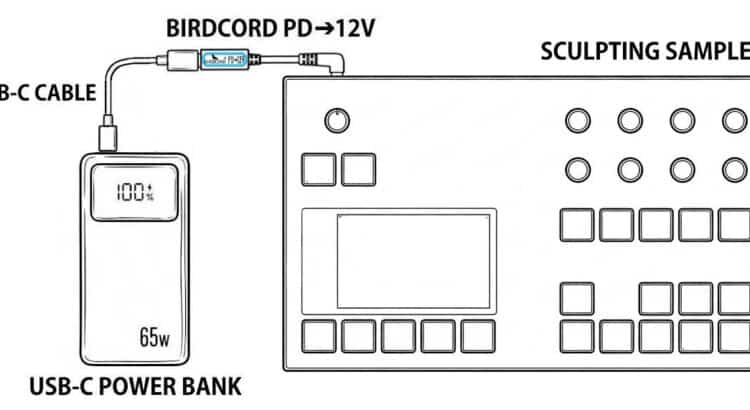
Torso Electronics S4 Sculpting Sampler with a USB-C power bank and a Birdcord PD→12V

How to Power the Torso Electronics S4 with a USB-C Power Bank

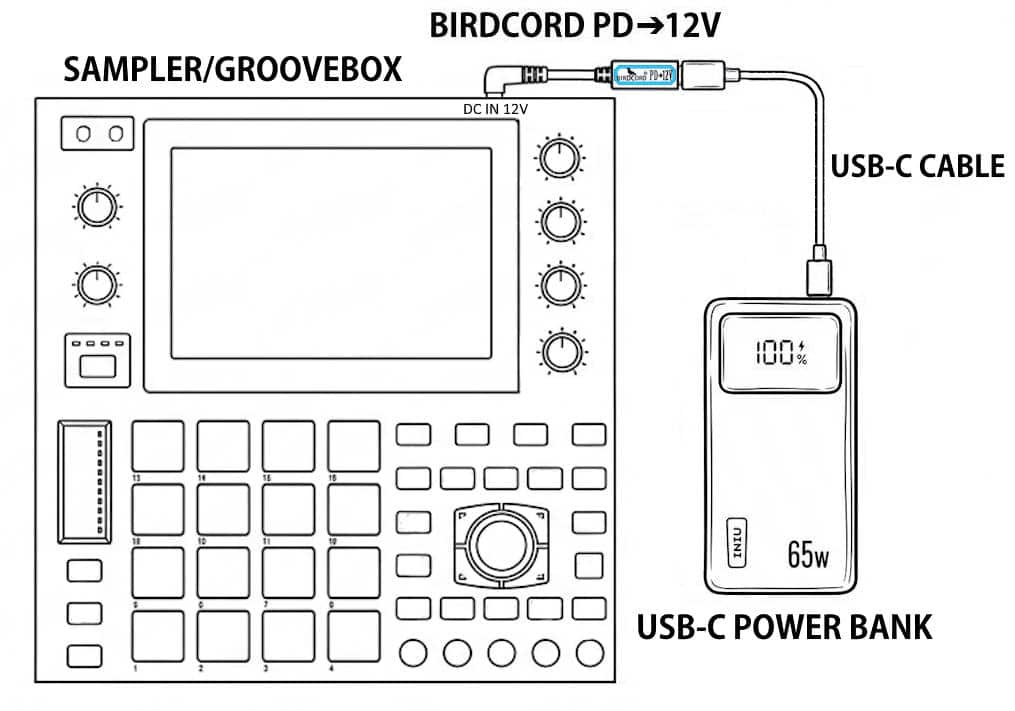
The Torso Electronics S4 Sculpting Sampler can run off a USB-C power bank using a Birdcord PD➔12V power cable. The setup diagram below shows how to connect the devices for portable operation without a mains power outlet, for example, when making music in the garden or while commuting by train.
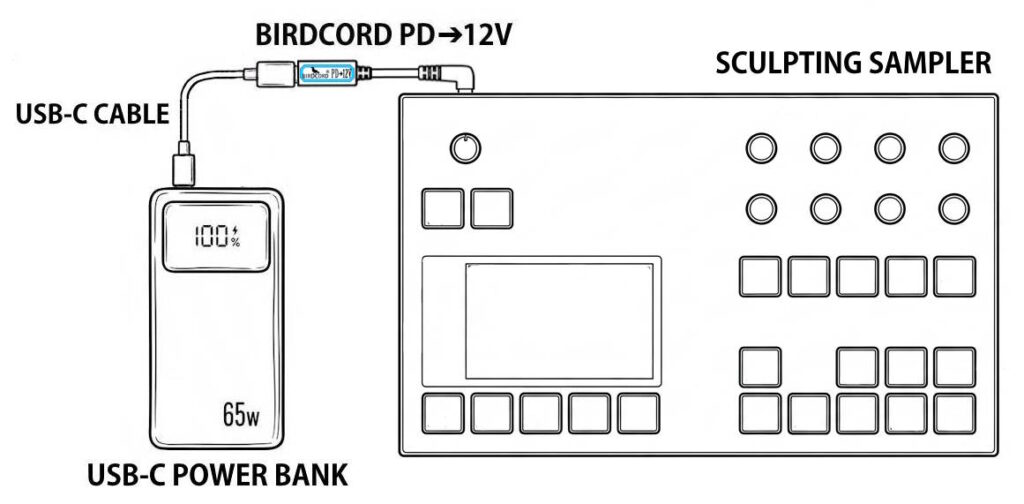
Torso Electronics S4 Sculpting Sampler with a USB-C power bank and a Birdcord PD→12V

Quick Facts: Torso Electronics S4 Mobile Setup

DeviceTorso Electronics S4
Supply voltage12 V DC
Current drawmax. 1.5 A
Power consumptionmax. 18 W
Connector5.5 x 2.5 mm
PolarityCenter positive
Power sourceUSB-C power bank*
Compatible power converterBirdcord PD➔12V
StatusTested and verified

*Note: Requires a USB-C power bank with USB Power Delivery (PD) support and a 12V output profile. The power rating should be higher than the power consumption.

What You Need

✅ Birdcord PD➔12V – A compact USB-C power cable that requests 12 V output from a compatible USB-C power bank and delivers it to the Torso Electronics S4. View product

✅ USB-C Power Bank – A power bank that supports USB Power Delivery (PD) and a 12V output profile. A minimum rating of 36 W and 10,000 mAh is recommended. Recommended: INIU 65 W 20,000 mAh USB-C PD Power Bank

✅ USB-C cable – To connect the power bank to the Birdcord PD➔12V (usually included with the power bank). View product

How It Works

The Torso Electronics S4 requires a stable 12 V DC power supply. Since USB-C power banks don’t automatically provide the correct voltage, a Birdcord PD➔12V is needed to communicate with the power bank and request the right output voltage. The power bank then provides 12V DC, allowing the Torso Electronics S4 to run directly from a portable battery.

Simply connect the Birdcord PD➔12V to a compatible USB-C PD power bank and plug the DC connector into the Torso Electronics S4. The setup works exactly like using the original power adapter, but gives you the freedom to perform anywhere.

Frequently Asked Questions (FAQ)

How long can the Torso Electronics S4 run on a USB-C power bank?

A 20,000 mAh USB-C power bank will typically power the Torso Electronics S4 for more than 4 hours.

I already have a power bank. Will it work?

Yes, as long as it supports 12 V output. You can easily check this by looking at the technical specifications printed in small letters on your power bank. If you see an output listing like 12V⎓2A, 12V⎓3A (or anything similar), it is compatible and will work perfectly. If it only lists 5V, it is not compatible.

Can I power the Torso Electronics S4 directly from USB-C?

No. The Torso Electronics S4 requires 12 V DC power and cannot be powered directly from a standard USB-C output. A Birdcord PD➔12V is required to request the correct voltage from a compatible USB-C power bank.

How to choose a USB-C power bank for the Torso Electronics S4?

Choose a USB-C power bank with USB Power Delivery (PD) support and a 12 V output profile. Please note that not all USB PD power banks support 12 V output.

To check compatibility, look at the technical specifications of the power bank. The supported output voltages are usually listed as something like 5V⎓3A, 9V⎓3A, 12V⎓2.25A or similar. If 12V is listed as an output option, the power bank is compatible with the Birdcord PD➔12V.

A capacity of 10,000 mAh or higher and a power output of 36 W or higher are recommended for a reliable portable setup.

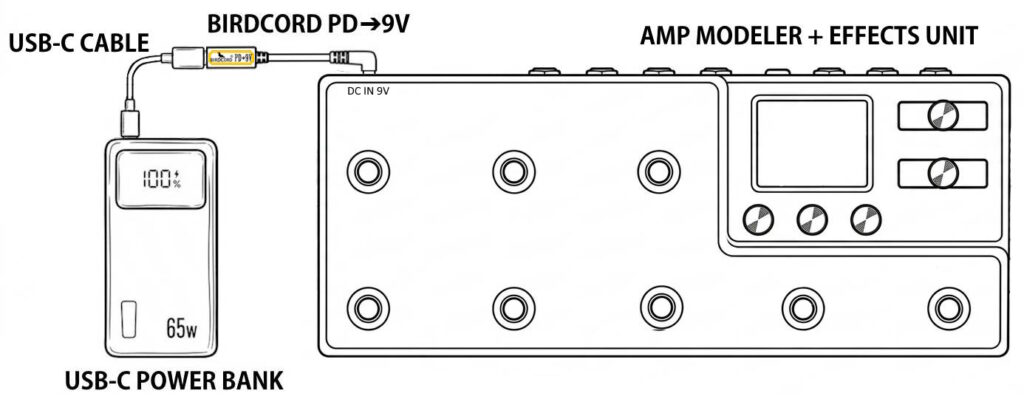
Line 6 HX Stomp XL Amp Modeler and Multieffects Unit powered portably with a USB-C power bank and a Birdcord PD→9V

How to Power the Line 6 HX Stomp XL with a USB-C Power Bank

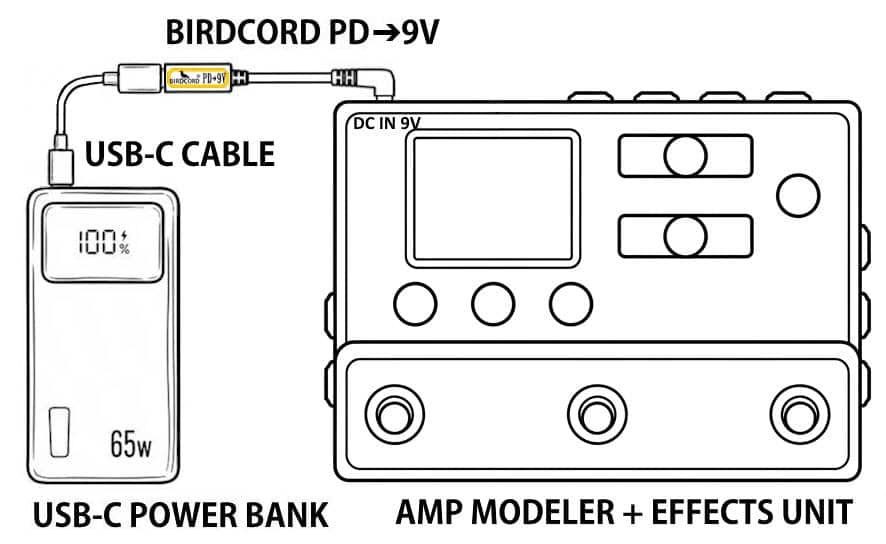
The Line 6 HX Stomp XL Amp Modeler and Effects Unit can be powered from a USB-C power bank using a Birdcord PD➔9V power cable. The setup diagram below shows how to connect the devices for portable operation without a mains outlet, for example, when playing music in your garden or for busking on the streets.

Line 6 HX Stomp XL Amp Modeler and Multieffects Unit powered portably with a USB-C power bank and a Birdcord PD→9V

Quick Facts: Line 6 HX Stomp XL Mobile Setup

DeviceLine 6 HX Stomp XL
Supply voltage9 V DC
Current draw1.0 A
Power consumption9 W
Connector5.5 x 2.5 mm
PolarityCenter negative
Power sourceUSB-C power bank*
Compatible power converterBirdcord PD➔9V
StatusTested and verified

*Note: Use a USB-C power bank with USB Power Delivery (PD) and/or Quick Charge 4/4+ support. The power rating should be higher than the power consumption.

What You Need

✅ Birdcord PD➔9V – A compact USB-C power cable that requests 9 V output from a compatible USB-C power bank and delivers it to the Line 6 HX Stomp XL. View product

✅ USB-C Power Bank – A power bank that supports USB Power Delivery (PD) and/or Quick Charge 4/4+. A minimum rating of 27 W and 10,000 mAh is recommended. Recommended: INIU 65 W 20,000 mAh USB-C PD Power Bank

✅ USB-C cable – To connect the power bank to the Birdcord PD➔9V (usually included with the power bank). View product

How It Works

The Line 6 HX Stomp XL requires a stable 9 V DC power supply. Since USB-C power banks don’t automatically provide the correct voltage, a Birdcord PD➔9V is needed to communicate with the power bank and request the right output voltage. The power bank then provides 9V DC, allowing the Line 6 HX Stomp XL to run directly from a portable battery.

Simply connect the Birdcord PD➔9V to a USB-C power bank and plug the DC connector into the HX Stomp XL. The setup works exactly like using the original power adapter, but gives you the freedom to play anywhere.

Frequently Asked Questions (FAQ)

How long can it run on a USB-C power bank?

With a standard 20,000 mAh (74 Wh) power bank, the Line 6 HX Stomp XL will run for over 6 hours of continuous use.

I already have a power bank. Will it work?

Yes, as long as it supports 9 V output. You can easily check this by looking at the technical specifications printed in small letters on your power bank. If you see an output listing like 9V⎓3A (or anything similar), it is compatible and will work perfectly. If it only lists 5V, it is not compatible.

Will this setup introduce any ground loop noise or hum?

No, quite the opposite! Since your Line 6 HX Stomp XL is completely disconnected from the mains grid and runs on isolated battery power, you actually eliminate ground loop hum entirely. It is one of the quietest ways to power your rig.

How to choose the right USB-C cable?

You don’t need a special USB-C cable advertised as PD-compatible. Any standard USB-C charging cable will work with your Birdcord PD➔9V.
The Birdcord PD➔9V has a built-in e-marker that handles the PD communication with your power bank, so there’s no need for a special PD-rated cable.

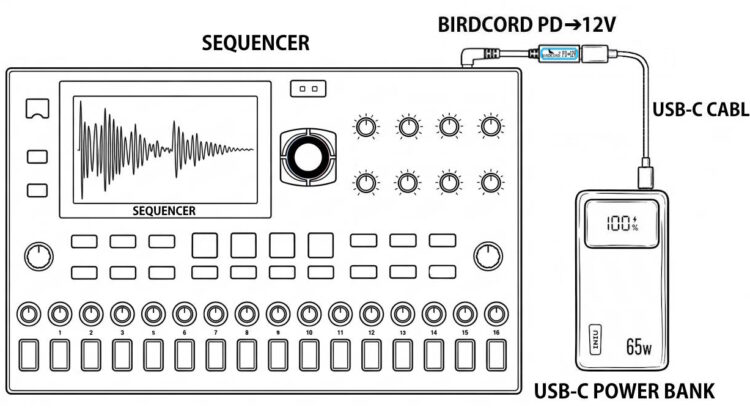
Behringer IGNITE sequencer powered portably with a USB-C power bank and a Birdcord PD→12V

How to Power the Behringer IGNITE with a USB-C Power Bank

Behringer announced their upcoming Behringer IGNITE, a 64-track open-source sequencer. The power specifications have already been released, so we already know it will be possible to power it portably from a USB-C power bank using a Birdcord PD➔12V, as shown in the setup diagram below. This means you can take it outside, use it in the park, on the train, or wherever you feel like.

Behringer IGNITE sequencer powered portably with a USB-C power bank and a Birdcord PD→12V

Quick Facts: Behringer IGNITE Mobile Setup

DeviceBehringer IGNITE
Supply voltage12 V DC
Current drawmax. 2 A
Power consumptionmax. 24 W
Connector5.5 x 2.5 mm
PolarityCenter positive
Power sourceUSB-C power bank*
Compatible power converterBirdcord PD➔12V
StatusNot tested yet

*Note: Requires a USB-C power bank with USB Power Delivery (PD) support and a 12V output profile. The power rating should be higher than the power consumption.

What You Need

✅ Birdcord PD➔12V – A compact USB-C power cable that requests 12 V output from a compatible USB-C power bank and delivers it to the Behringer IGNITE. View product

✅ USB-C Power Bank – A power bank that supports USB Power Delivery (PD) and a 12V output profile. A minimum rating of 36 W and 10,000 mAh is recommended. Recommended: INIU 65 W 20,000 mAh USB-C PD Power Bank

✅ USB-C cable – To connect the power bank to the Birdcord PD➔12V (usually included with the power bank). View product

How It Works

The Behringer IGNITE requires a stable 12 V DC power supply. Since USB-C power banks don’t automatically provide the correct voltage, a Birdcord PD➔12V is needed to communicate with the power bank and request the right output voltage. The power bank then provides 12V DC, allowing the Behringer IGNITE to run directly from a portable battery.

Simply connect the Birdcord PD➔12V to a compatible USB-C PD power bank and plug the DC connector into the Behringer IGNITE. The setup works exactly like using the original power adapter, but gives you the freedom to perform anywhere.

Frequently Asked Questions (FAQ)

How long can the Behringer IGNITErun on a USB-C power bank?

A 20,000 mAh USB-C power bank will power the Behringer IGNITE for at least 2.5 hours. Possibly a lot longer. We will find out once they release it.

I already have a power bank. Will it work?

Yes, as long as it supports 12 V output. You can easily check this by looking at the technical specifications printed in small letters on your power bank. If you see an output listing like 12V⎓2A, 12V⎓3A (or anything similar), it is compatible and will work perfectly. If it only lists 5V, it is not compatible.

Can I power the Behringer IGNITE directly from USB-C?

No. The Behringer IGNITE requires 12 V DC power and cannot be powered directly from a standard USB-C output. A Birdcord PD➔12V is required to request the correct voltage from a compatible USB-C power bank.

How to choose a USB-C power bank for the Behringer IGNITE?

Choose a USB-C power bank with USB Power Delivery (PD) support and a 12 V output profile. Please note that not all USB PD power banks support 12 V output.

To check compatibility, look at the technical specifications of the power bank. The supported output voltages are usually listed as something like 5V⎓3A, 9V⎓3A, 12V⎓2.25A or similar. If 12V is listed as an output option, the power bank is compatible with the Birdcord PD➔12V.

A capacity of 10,000 mAh or higher and a power output of 36 W or higher are recommended for a reliable portable setup.
Behringer KICK sampler groovebox powered portably with a USB-C power bank and a Birdcord PD→12V

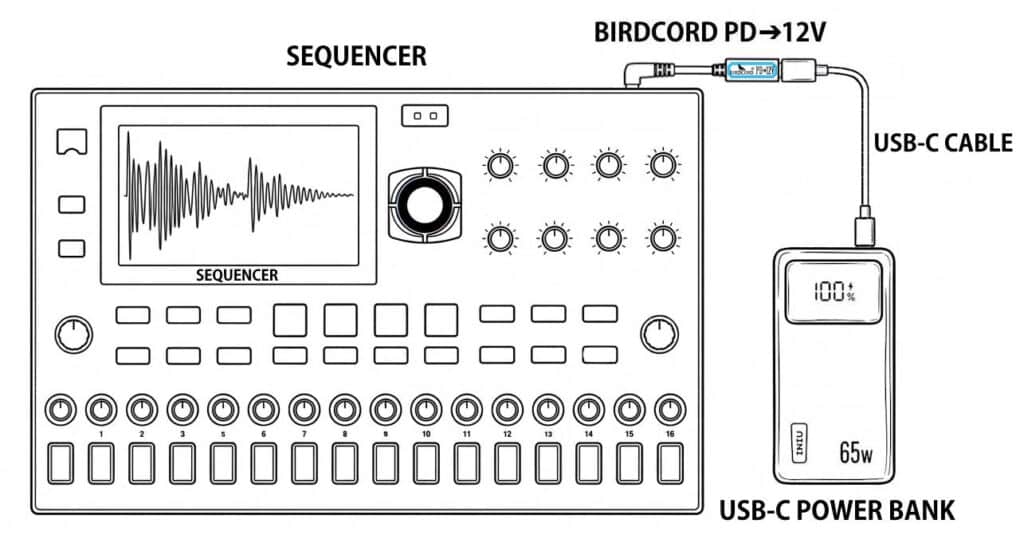
How to Power the Behringer KICK with a USB-C Power Bank

Behringer announced their upcoming Behringer KICK, an open-source sampler groovebox. Many call it an MPC clone. The power specifications have already been released, so we already know it will be possible to power it portably from a USB-C power bank using a Birdcord PD➔12V, as shown in the setup diagram below. This means you can take it outside, use it in the park, on the train, or wherever you feel like.

Behringer KICK Sampler Groovebox powered portably with a USB-C power bank and a Birdcord PD→12V

Quick Facts: Behringer KICK Mobile Setup

DeviceBehringer KICK
Supply voltage12 V DC
Current drawmax. 2 A
Power consumptionmax. 24 W
Connector5.5 x 2.5 mm
PolarityCenter positive
Power sourceUSB-C power bank*
Compatible power converterBirdcord PD➔12V
StatusNot tested yet

*Note: Requires a USB-C power bank with USB Power Delivery (PD) support and a 12V output profile. The power rating should be higher than the power consumption.

What You Need

✅ Birdcord PD➔12V – A compact USB-C power cable that requests 12 V output from a compatible USB-C power bank and delivers it to the Behringer KICK. View product

✅ USB-C Power Bank – A power bank that supports USB Power Delivery (PD) and a 12V output profile. A minimum rating of 36 W and 10,000 mAh is recommended. Recommended: INIU 65 W 20,000 mAh USB-C PD Power Bank

✅ USB-C cable – To connect the power bank to the Birdcord PD➔12V (usually included with the power bank). View product

How It Works

The Behringer KICK requires a stable 12 V DC power supply. Since USB-C power banks don’t automatically provide the correct voltage, a Birdcord PD➔12V is needed to communicate with the power bank and request the right output voltage. The power bank then provides 12V DC, allowing the Behringer KICK to run directly from a portable battery.

Simply connect the Birdcord PD➔12V to a compatible USB-C PD power bank and plug the DC connector into the Behringer KICK. The setup works exactly like using the original power adapter, but gives you the freedom to perform anywhere.

Frequently Asked Questions (FAQ)

How long can the Behringer KICK run on a USB-C power bank?

A 20,000 mAh USB-C power bank will power the Behringer KICK for at least 2.5 hours. Possibly a lot longer. We will find out once they release it.

I already have a power bank. Will it work?

Yes, as long as it supports 12 V output. You can easily check this by looking at the technical specifications printed in small letters on your power bank. If you see an output listing like 12V⎓2A, 12V⎓3A (or anything similar), it is compatible and will work perfectly. If it only lists 5V, it is not compatible.

Can I power the Behringer KICK directly from USB-C?

No. The Behringer KICK requires 12 V DC power and cannot be powered directly from a standard USB-C output. A Birdcord PD➔12V is required to request the correct voltage from a compatible USB-C power bank.

How to choose a USB-C power bank for the Behringer KICK?

Choose a USB-C power bank with USB Power Delivery (PD) support and a 12 V output profile. Please note that not all USB PD power banks support 12 V output.

To check compatibility, look at the technical specifications of the power bank. The supported output voltages are usually listed as something like 5V⎓3A, 9V⎓3A, 12V⎓2.25A or similar. If 12V is listed as an output option, the power bank is compatible with the Birdcord PD➔12V.

A capacity of 10,000 mAh or higher and a power output of 36 W or higher are recommended for a reliable portable setup.
Line 6 HX Stomp Amp Modeler and Multieffects Unit powered portably with a USB-C power bank and a Birdcord PD→9V

How to Power the Line 6 HX Stomp with a USB-C Power Bank

The Line 6 HX Stomp Amp Modeler and Effects Unit can be powered from a USB-C power bank using a Birdcord PD➔9V power cable. The setup diagram below shows how to connect the devices for portable operation without a mains outlet, for example, when playing music in your garden or for busking on the streets.

Line 6 Amp Modeler and Multieffects Unit powered portably with a USB-C power bank and a Birdcord PD→9V

Quick Facts: Line 6 HX Stomp Mobile Setup

DeviceLine 6 HX Stomp
Supply voltage9 V DC
Current draw1.0 A
Power consumption9 W
Connector5.5 x 2.5 mm
PolarityCenter negative
Power sourceUSB-C power bank*
Compatible power converterBirdcord PD➔9V
StatusTested and verified

*Note: Use a USB-C power bank with USB Power Delivery (PD) and/or Quick Charge 4/4+ support. The power rating should be higher than the power consumption.

What You Need

✅ Birdcord PD➔9V – A compact USB-C power cable that requests 9 V output from a compatible USB-C power bank and delivers it to the Line 6 HX Stomp. View product

✅ USB-C Power Bank – A power bank that supports USB Power Delivery (PD) and/or Quick Charge 4/4+. A minimum rating of 18 W and 10,000 mAh is recommended. Recommended: INIU 65 W 20,000 mAh USB-C PD Power Bank

✅ USB-C cable – To connect the power bank to the Birdcord PD➔9V (usually included with the power bank). View product

How It Works

The Line 6 HX Stomp requires a stable 9 V DC power supply. Since USB-C power banks don’t automatically provide the correct voltage, a Birdcord PD➔9V is needed to communicate with the power bank and request the right output voltage. The power bank then provides 9V DC, allowing the Line 6 HX Stomp to run directly from a portable battery.

Simply connect the Birdcord PD➔9V to a USB-C power bank and plug the DC connector into the HX Stomp. The setup works exactly like using the original power adapter, but gives you the freedom to play anywhere.

Frequently Asked Questions (FAQ)

How long can it run on a USB-C power bank?

With a standard 20,000 mAh (74 Wh) power bank, the Line 6 HX Stomp will run for over 6.5 hours of continuous use.

I already have a power bank. Will it work?

Yes, as long as it supports 9 V output. You can easily check this by looking at the technical specifications printed in small letters on your power bank. If you see an output listing like 9V=2A, 9V=3A (or anything similar), it is compatible and will work perfectly. If it only lists 5V, it is not compatible.

Will this setup introduce any ground loop noise or hum?

No, quite the opposite! Since your Line 6 HX Stomp is completely disconnected from the mains grid and runs on isolated battery power, you actually eliminate ground loop hum entirely. It is one of the quietest ways to power your rig.

How to choose the right USB-C cable?

You don’t need a special USB-C cable advertised as PD-compatible. Any standard USB-C charging cable will work with your Birdcord PD➔9V.
The Birdcord PD➔9V has a built-in e-marker that handles the PD communication with your power bank, so there’s no need for a special PD-rated cable.

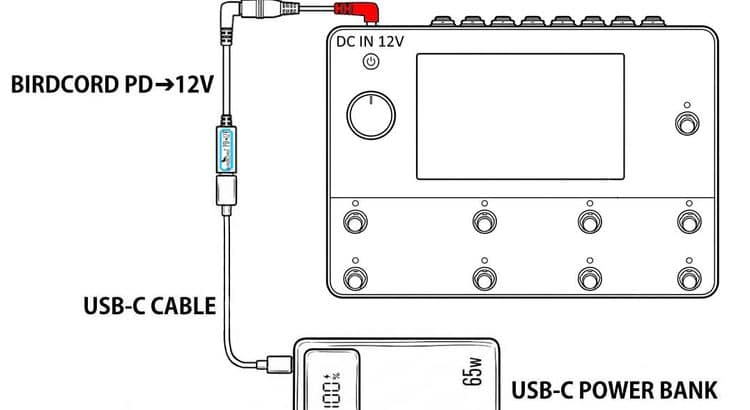
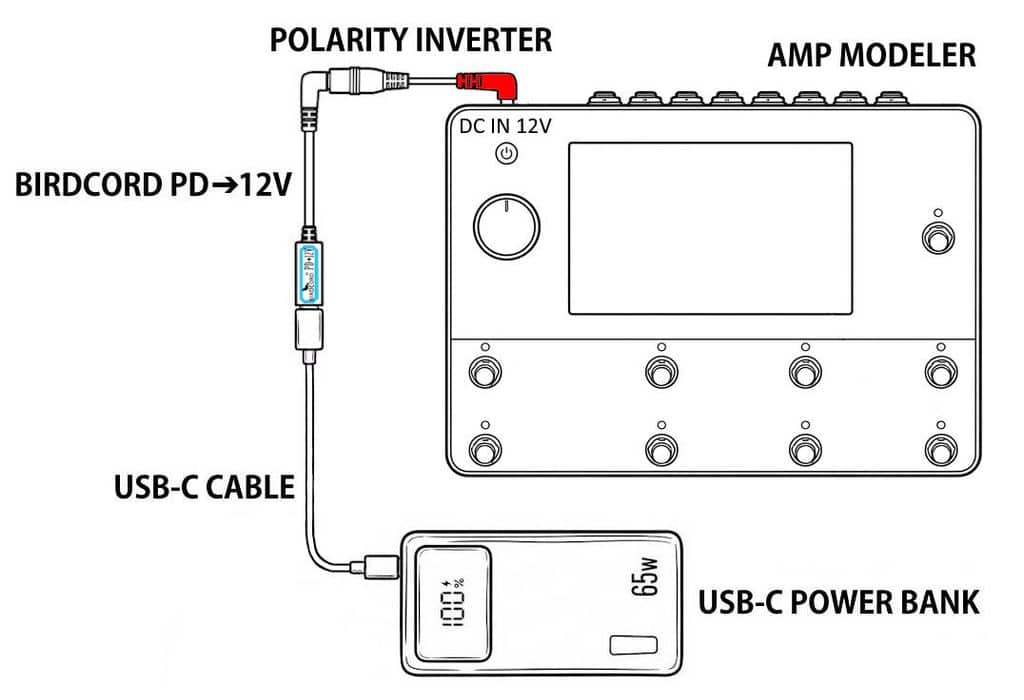
Neural DSP Quad Cortex Floorboard Amp Modeler Multieffects Unit powered portably with a USB-C power bank and a Birdcord PD→12V plus Polarity Inverter Cable

How to Power the Neural DSP Quad Cortex with a USB-C Power Bank

The Neural DSP Quad Cortex Amp Modeler can be powered from a USB-C power bank using a Birdcord PD➔12V power cable and a Polarity Inverter cable. The setup diagram below shows how to connect the devices for portable operation without a mains outlet, for example, when playing music in your garden or for busking on the streets.

Quick Facts: Neural DSP Quad Cortex Mobile Setup

DeviceNeural DSP Quad Cortex
Supply voltage12 V DC
Current draw2 A
Power consumption24 W
Connector5.5 x 2.1 mm
PolarityCenter negative
Power sourceUSB-C power bank*
Compatible power converterBirdcord PD➔12V + Polarity Inverter Cable
StatusTested and verified

*Note: Requires a USB-C power bank with USB Power Delivery (PD) support and a 12V output profile. The power rating should be higher than the power consumption.

What You Need

✅ Birdcord PD➔12V – A compact USB-C power cable that requests 12 V output from a compatible USB-C power bank, and delivers it to the connected device. View product

✅ Polarity Inverter Cable – A small adapter cable that turns the center postive output polarity of the Birdcord PD➔12V into center negative, making the Birdcord PD➔12V compatible with the Neural DSP Quad Cortex. View product

✅ USB-C Power Bank – A power bank that supports USB Power Delivery (PD) and a 12V output profile. A minimum rating of 36 W and 10,000 mAh is recommended. Recommended: INIU 65 W 20,000 mAh USB-C PD Power Bank

✅ USB-C cable – To connect the power bank to the Birdcord PD➔12V (usually included with the power bank). View product

How It Works

The Neural DSP Quad Cortex requires a stable 12 V DC power supply. Since USB-C power banks don’t automatically provide the correct voltage, a Birdcord PD➔12V is needed to communicate with the power bank and request the right output voltage. The power bank then provides 12V DC, allowing the Quad Cortex to run directly from a portable battery.

Connect the Birdcord PD➔12V to the power bank using a USB-C cable, then plug its output connector into the Polarity Inverter cable, and the Polarity Inverter cable’s output connector into the Quad Cortex. The setup works exactly like using the original power adapter, but gives you the freedom to create music anywhere.

Frequently Asked Questions (FAQ)

How long can it run on a USB-C power bank?

With a standard 20,000 mAh (74 Wh) power bank, the Neural DSP Quad Cortex will run for over 2.5 hours of continuous use under typical operating conditions.

Will my existing power bank work?

Yes, as long as it supports 12 V output. You can easily check this by looking at the technical specifications printed in small letters on your power bank. If you see an output listing like 12V=3A (or anything similar), it is compatible and will work perfectly. If it only lists 5V, it is not compatible.

Will this setup introduce any ground loop noise or hum?

No. Since your Neural DSP Quad Cortex is completely disconnected from the mains grid and runs on isolated battery power, you actually eliminate ground-loop hum. It is one of the quietest ways to power your gear.

Can this power setup damage my Quad Cortex?

No. This power setup has been successfully tested by multiple users. The electrical output specifications are similar to the original PSU.

Roland CUBE-10GX Guitar Amplifier powered portably with a USB-C power bank and a Birdcord PD→6V

How to Power the Roland CUBE-10GX with a USB-C Power Bank

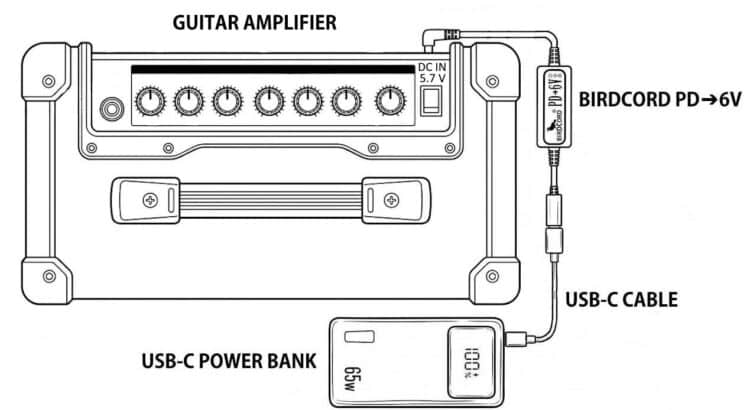
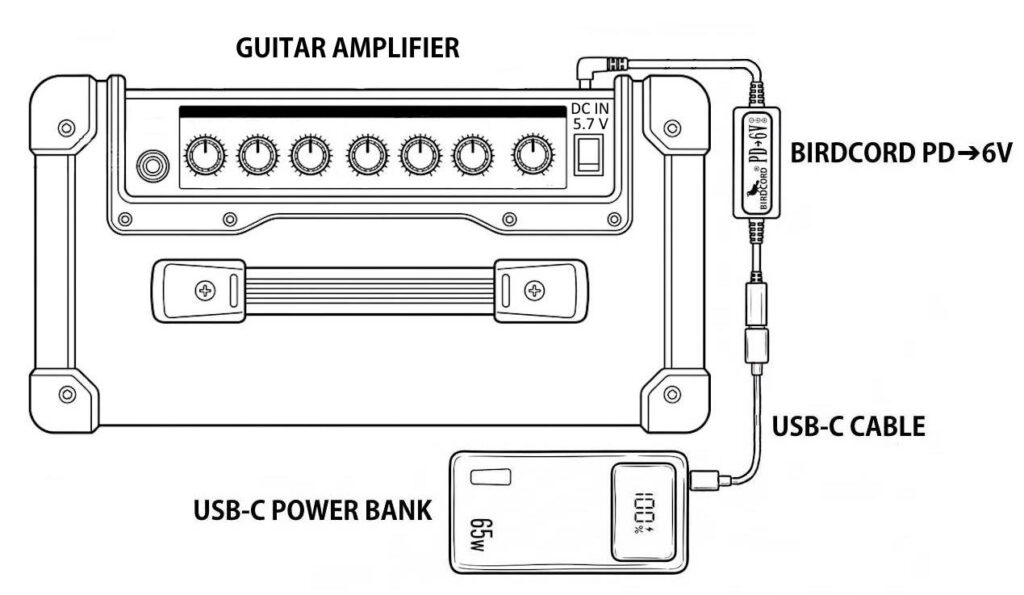
The Roland CUBE-10GX Guitar Amplifier can be powered from a USB-C power bank using a Birdcord PD➔6V power cable. The setup diagram below shows how to connect the devices for portable operation without a mains outlet, for example when playing music in your garden or for busking on the streets.

Roland CUBE-10GX Guitar Amplifier powered portably with a USB-C power bank and a Birdcord PD→6V

Quick Facts: Roland CUBE-10GX Mobile Setup

DeviceRoland CUBE-10GX
Supply voltage5.7-6 V DC
Current draw0.7 A
Power consumption4.2 W
Connector5.5 x 2.1 mm
PolarityCenter negative
Power sourceUSB-C power bank*
Compatible power converterBirdcord PD➔6V
StatusTested and verified

*Note: Use a USB-C power bank with USB Power Delivery (PD) and/or Quick Charge 4/4+ support. The power rating should be higher than the power consumption.

What You Need

✅ Birdcord PD➔6V – A compact USB-C power cable that requests 9 V output from a compatible USB-C power bank, converts it to 6 V, and delivers it to the Roland CUBE-10GX. View product

✅ USB-C Power Bank – A power bank that supports USB Power Delivery (PD) and/or Quick Charge 4/4+. A minimum rating of 18 W and 10,000 mAh is recommended. Recommended: INIU 65 W 20,000 mAh USB-C PD Power Bank

✅ USB-C cable – To connect the power bank to the Birdcord PD➔6V (usually included with the power bank). View product

How It Works

The Roland CUBE-10GX requires a DC power supply in the 5.7-6 V range. USB-C power banks typically provide 5 V by default, so a compatible voltage converter is needed to obtain the required voltage.

The Birdcord PD➔6V negotiates a 9V DC output with a compatible USB-C power bank and converts it to 6 V DC for the CUBE-10GX.

Connect the Birdcord PD➔6V to the power bank using a USB-C cable, then plug the DC connector into the CUBE-10GX. The setup works exactly like using the original power adapter, but gives you the freedom to create music anywhere.

Frequently Asked Questions (FAQ)

How long can it run on a USB-C power bank?

With a standard 20,000 mAh (74 Wh) power bank, the Roland CUBE-10GX will run for over 14 hours of continuous use under typical operating conditions.

Will my existing power bank work?

Yes, as long as it supports 9 V output. You can easily check this by looking at the technical specifications printed in small letters on your power bank. If you see an output listing like 9V=2A, 9V=3A (or anything similar), it is compatible and will work perfectly. If it only lists 5V, it is not compatible.

Will this setup introduce any ground loop noise or hum?

No. Since your Roland CUBE-10GX is completely disconnected from the mains grid and runs on isolated battery power, you actually eliminate ground-loop hum. It is one of the quietest ways to power your gear.

Can I power other equipment from the same power bank?

Potentially, yes, provided the power bank has suitable outputs to meet the power requirements of all connected devices. You can usually find the output specifications printed in small letters on the back of the power bank.

Can this power setup damage my CUBE-10GX?

No. We thoroughly tested this setup and monitored the CUBE-10GX’s voltage regulator temperature throughout testing. The Birdcord PD➔6V supplies a slightly higher voltage than the original PSD power adapter. Our tests confirmed that the CUBE-10GX works reliably with this setup.

Roland TR-8S Rhythm Performer powered portably with a USB-C power bank and a Birdcord PD→6V

How to Power the Roland TR-8S with a USB-C Power Bank

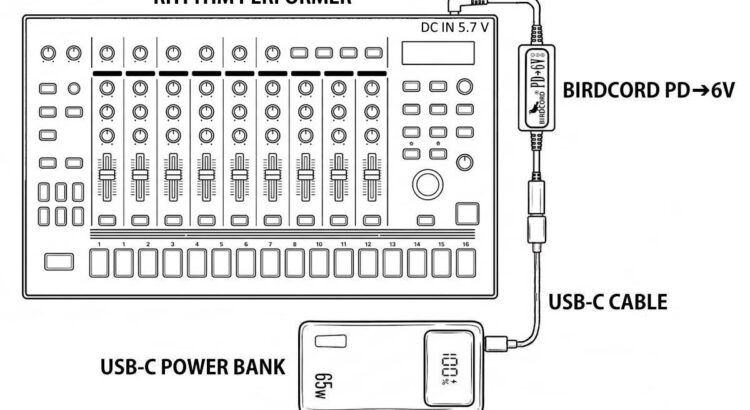
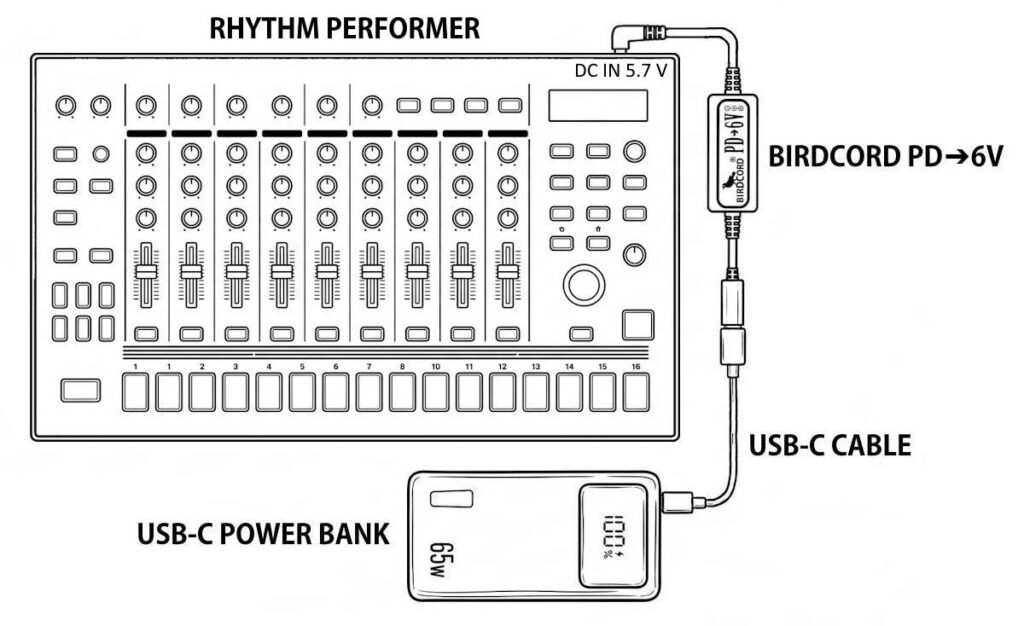
The Roland TR-8S Rhythm Performer can be powered from a USB-C power bank using a Birdcord PD➔6V power cable. The setup diagram below shows how to connect the devices for portable operation without a mains outlet, for example when making music outdoors, travelling by train, or just sitting on the couch.

Roland TR-8S Rhythm Performer powered portably with a USB-C power bank and a Birdcord PD→6V

Quick Facts: Roland TR-8S Mobile Setup

DeviceRoland TR-8S
Supply voltage5.7-6 V DC
Current drawmax. 2.0 A
Power consumptionmax. 12 W
Connector5.5 x 2.1 mm
PolarityCenter negative
Power sourceUSB-C power bank*
Compatible power converterBirdcord PD➔6V
StatusTested and verified

*Note: Use a USB-C power bank with USB Power Delivery (PD) and/or Quick Charge 4/4+ support. The power rating should be higher than the power consumption.

What You Need

✅ Birdcord PD➔6V – A compact USB-C power cable that requests 9 V output from a compatible USB-C power bank, converts it to 6 V, and delivers it to the Roland TR-8S. View product

✅ USB-C Power Bank – A power bank that supports USB Power Delivery (PD) and/or Quick Charge 4/4+. A minimum rating of 18 W and 10,000 mAh is recommended. Recommended: INIU 65 W 20,000 mAh USB-C PD Power Bank

✅ USB-C cable – To connect the power bank to the Birdcord PD➔6V (usually included with the power bank). View product

How It Works

The Roland TR-8S requires a DC power supply in the 5.7-6 V range. USB-C power banks typically provide 5 V by default, so a compatible voltage converter is needed to obtain the required voltage.

The Birdcord PD➔6V negotiates a 9V DC output with a compatible USB-C power bank and converts it to 6 V DC for the TR-8S.

Connect the Birdcord PD➔6V to the power bank using a USB-C cable, then plug the DC connector into the TR-8S. The setup works exactly like using the original power adapter, but gives you the freedom to create music anywhere.

Frequently Asked Questions (FAQ)

How long can it run on a USB-C power bank?

With a standard 20,000 mAh (74 Wh) power bank, the Roland TR-8S will run for over 6 hours of continuous use under typical operating conditions.

Will my existing power bank work?

Yes, as long as it supports 9 V output. You can easily check this by looking at the technical specifications printed in small letters on your power bank. If you see an output listing like 9V=2A, 9V=3A (or anything similar), it is compatible and will work perfectly. If it only lists 5V, it is not compatible.

Will this setup introduce any ground loop noise or hum?

No. Since your Roland TR-8S is completely disconnected from the mains grid and runs on isolated battery power, you actually eliminate ground-loop hum. It is one of the quietest ways to power your gear.

Can I power other equipment from the same power bank?

Potentially, yes, provided the power bank has suitable outputs to meet the power requirements of all connected devices. You can usually find the output specifications printed in small letters on the back of the power bank.

Can this power setup damage my TR-8S?

No. We thoroughly tested this setup and monitored the TR-8S’s voltage regulator temperature throughout testing. The Birdcord PD➔6V supplies a slightly higher voltage than the original PSD power adapter. Our tests confirmed that the TR-8S works reliably with this setup.

Roland JD-Xi Synthesizer powered portably with a USB-C power bank and a Birdcord PD→6V

How to Power the Roland JD-Xi with a USB-C Power Bank

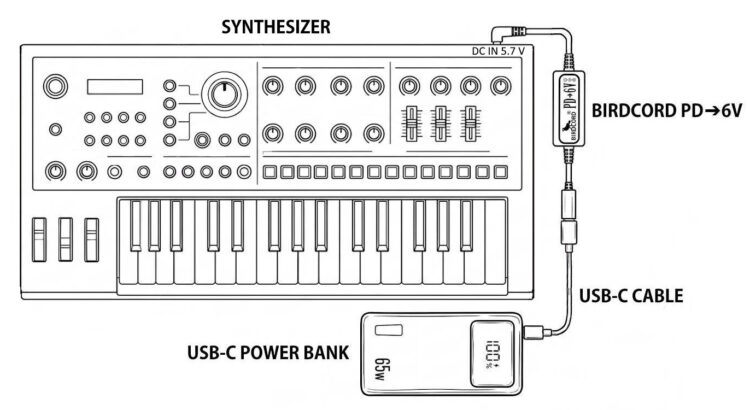
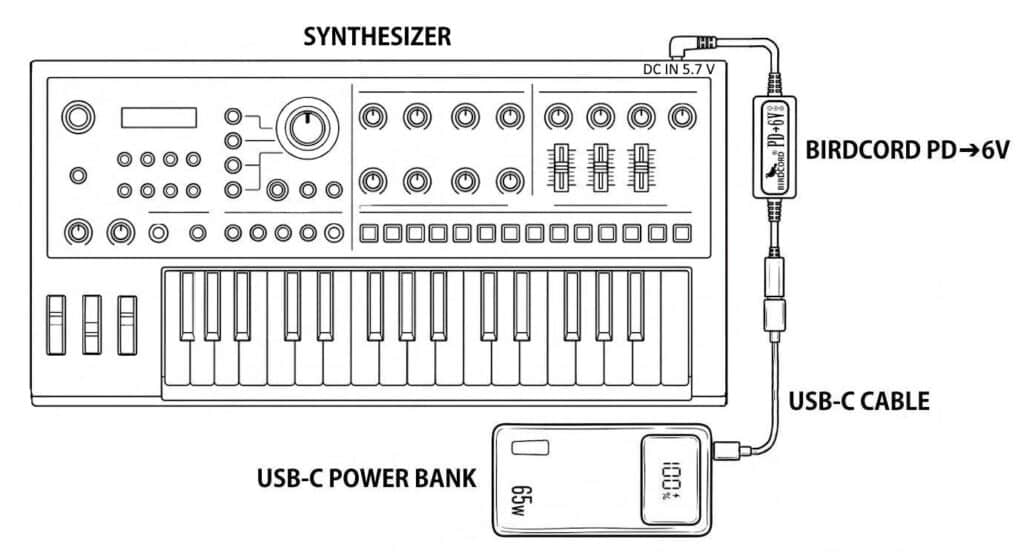
The Roland JD-Xi Synthesizer can be powered from a USB-C power bank using a Birdcord PD➔6V power cable. The setup diagram below shows how to connect the devices for portable operation without a mains outlet, for example when making music outdoors, travelling by train, or just sitting on the couch.

Roland JD-Xi Synthesizer powered portably with a USB-C power bank and a Birdcord PD→6V

Quick Facts: Roland JD-Xi Mobile Setup

DeviceRoland JD-Xi
Supply voltage5.7-6 V DC
Current draw1.0 A
Power consumption6 W
Connector5.5 x 2.1 mm
PolarityCenter negative
Power sourceUSB-C power bank*
Compatible power converterBirdcord PD➔6V
StatusTested and verified

*Note: Use a USB-C power bank with USB Power Delivery (PD) and/or Quick Charge 4/4+ support. The power rating should be higher than the power consumption.

What You Need

✅ Birdcord PD➔6V – A compact USB-C power cable that requests 9 V output from a compatible USB-C power bank, converts it to 6 V, and delivers it to the Roland JD-Xi. View product

✅ USB-C Power Bank – A power bank that supports USB Power Delivery (PD) and/or Quick Charge 4/4+. A minimum rating of 18 W and 10,000 mAh is recommended. Recommended: INIU 65 W 20,000 mAh USB-C PD Power Bank

✅ USB-C cable – To connect the power bank to the Birdcord PD➔6V (usually included with the power bank). View product

How It Works

The Roland JD-Xi requires a DC power supply in the 5.7-6 V range. USB-C power banks typically provide 5 V by default, so a compatible voltage converter is needed to obtain the required voltage.

The Birdcord PD➔6V negotiates a 9V DC output with a compatible USB-C power bank and converts it to 6 V DC for the JD-Xi.

Connect the Birdcord PD➔6V to the power bank using a USB-C cable, then plug the DC connector into the JD-Xi. The setup works exactly like using the original power adapter, but gives you the freedom to create music anywhere.

Frequently Asked Questions (FAQ)

How long can it run on a USB-C power bank?

With a standard 20,000 mAh (74 Wh) power bank, the Roland JD-Xi will run for over 9 hours of continuous use under typical operating conditions.

Will my existing power bank work?

Yes, as long as it supports 9 V output. You can easily check this by looking at the technical specifications printed in small letters on your power bank. If you see an output listing like 9V=2A, 9V=3A (or anything similar), it is compatible and will work perfectly. If it only lists 5V, it is not compatible.

Will this setup introduce any ground loop noise or hum?

No. Since your Roland JD-Xi is completely disconnected from the mains grid and runs on isolated battery power, you actually eliminate ground-loop hum. It is one of the quietest ways to power your gear.

Can I power other equipment from the same power bank?

Potentially, yes, provided the power bank has suitable outputs to meet the power requirements of all connected devices. You can usually find the output specifications printed in small letters on the back of the power bank.

Can this power setup damage my JD-Xi?

No. We thoroughly tested this setup and monitored the JD-Xi’s voltage regulator temperature throughout testing. The Birdcord PD➔6V supplies a slightly higher voltage than the original PSD power adapter. Our tests confirmed that the JD-Xi works reliably with this setup.

Roland SP-404MKII Creative Sampler and Effector powered portably with a USB-C power bank and a Birdcord PD→6V

How to Power the Roland SP-404MKII with a USB-C Power Bank

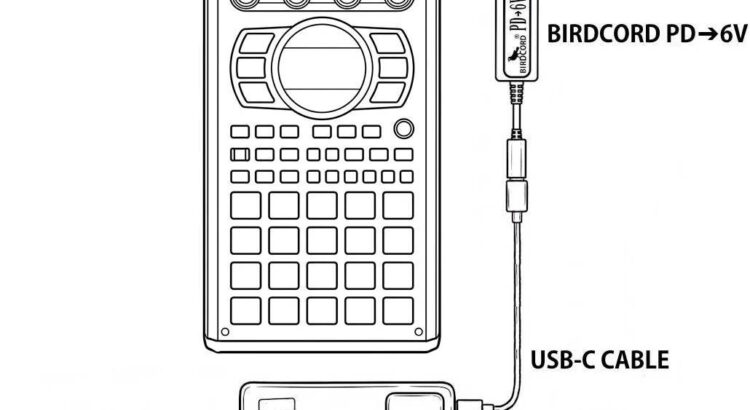
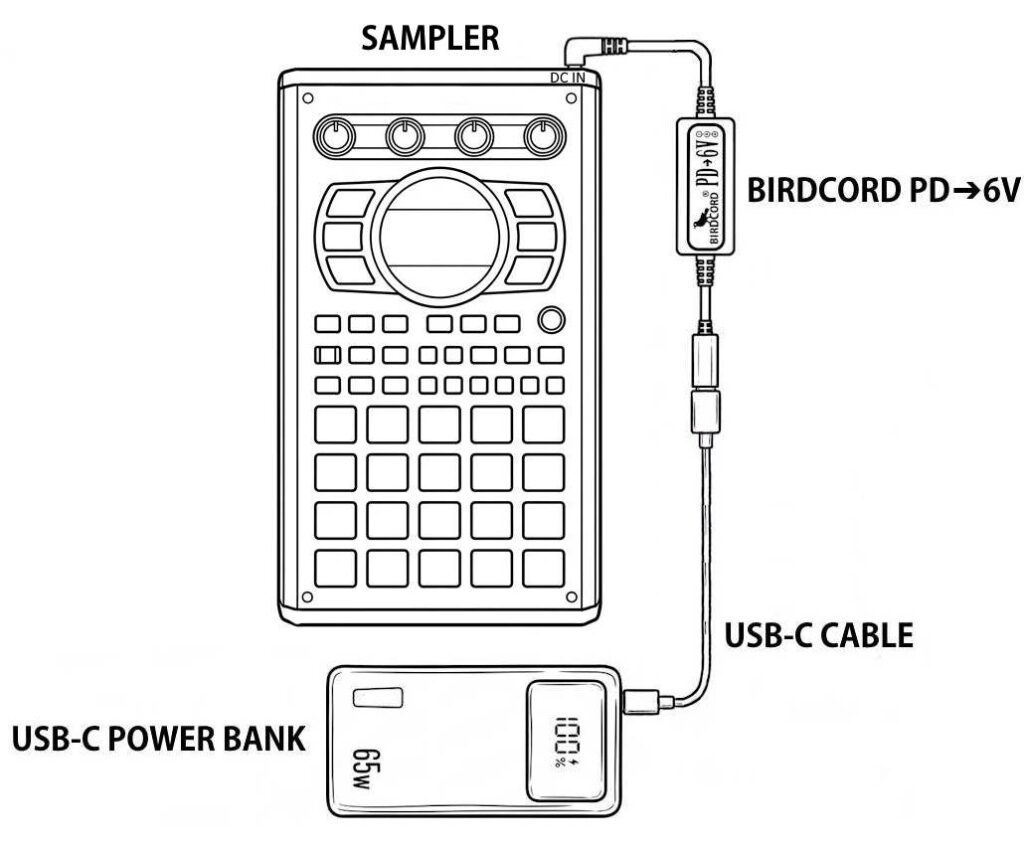
The Roland SP-404MKII Sampler can be powered from a USB-C power bank using a Birdcord PD➔6V power cable. The setup diagram below shows how to connect the devices for portable operation without a mains outlet, for example, when making music outdoors, travelling by train, or just sitting on the couch.

Roland SP-404MKII Creative Sampler and Effector powered portably with a USB-C power bank and a Birdcord PD→6V

Quick Facts: Roland SP-404MKII Mobile Setup

DeviceRoland SP-404MKII
Supply voltage5.7-6 V DC
Current drawmax. 1.1 A
Power consumptionmax. 6.6 W
Connector5.5 x 2.1 mm
PolarityCenter negative
Power sourceUSB-C power bank*
Compatible power converterBirdcord PD➔6V
StatusTested and verified

*Note: Use a USB-C power bank with USB Power Delivery (PD) and/or Quick Charge 4/4+ support. The power rating should be higher than the power consumption.

What You Need

✅ Birdcord PD➔6V – A compact USB-C power cable that requests 9 V output from a compatible USB-C power bank, converts it to 6 V, and delivers it to the Roland SP-404MKII. View product

✅ USB-C Power Bank – A power bank that supports USB Power Delivery (PD) and/or Quick Charge 4/4+. A minimum rating of 18 W and 10,000 mAh is recommended. Recommended: INIU 65 W 20,000 mAh USB-C PD Power Bank

✅ USB-C cable – To connect the power bank to the Birdcord PD➔6V (usually included with the power bank). View product

How It Works

The Roland SP-404MKII requires a DC power supply in the 5.7-6 V range. USB-C power banks typically provide 5 V by default, so a compatible voltage converter is needed to obtain the required voltage.

The Birdcord PD➔6V negotiates a 9V DC output with a compatible USB-C power bank and converts it to 6 V DC for the SP-404MKII.

Connect the Birdcord PD➔6V to the power bank using a USB-C cable, then plug the DC connector into the SP-404MKII. The setup works exactly like using the original power adapter, but gives you the freedom to create music anywhere.

Frequently Asked Questions (FAQ)

How long can it run on a USB-C power bank?

With a standard 20,000 mAh (74 Wh) power bank, the Roland SP-404MKII will run for over 11 hours of continuous use under typical operating conditions.

Will my existing power bank work?

Yes, as long as it supports 9 V output. You can easily check this by looking at the technical specifications printed in small letters on your power bank. If you see an output listing like 9V=2A, 9V=3A (or anything similar), it is compatible and will work perfectly. If it only lists 5V, it is not compatible.

Will this setup introduce any ground loop noise or hum?

No. Since your Roland SP-404MKII is completely disconnected from the mains grid and runs on isolated battery power, you actually eliminate ground-loop hum. It is one of the quietest ways to power your gear.

What’s the advantage of this setup over powering the SP-404MKII directly via USB-C?

The main advantage is that the SP-404MKII’s USB-C port remains available for audio, MIDI, and data connections while the device is powered through its DC input. This also keeps the power and data connections separate (to avoid noise).

Can this power setup damage my SP-404MKII?

No. We thoroughly tested this setup and monitored the SP-404MKII’s voltage regulator temperature throughout testing. The Birdcord PD➔6V supplies a slightly higher voltage than the original PSD power adapter. Our tests confirmed that the SP-404MKII works reliably with this setup.